i’m new to platformio, and every tutorial for using libraries just says to install them and nothing further. when i try #include <example.h> it throws an error, but every tutorial says that’s exactly what i’m supposed to do. it is installed via the proper process in the library manager, and i checked, it is present in .pio > libdeps any ideas? or proper documentation? i’ve googled for hours and can’t find anything that plainly explains any of this.
There are several ways to install libraries in a project.
- Via the GUI:
Click on the PlatformIO icon and select Quick Access / PIO HOME / Libraries. Search for the desired library and add it to your project.
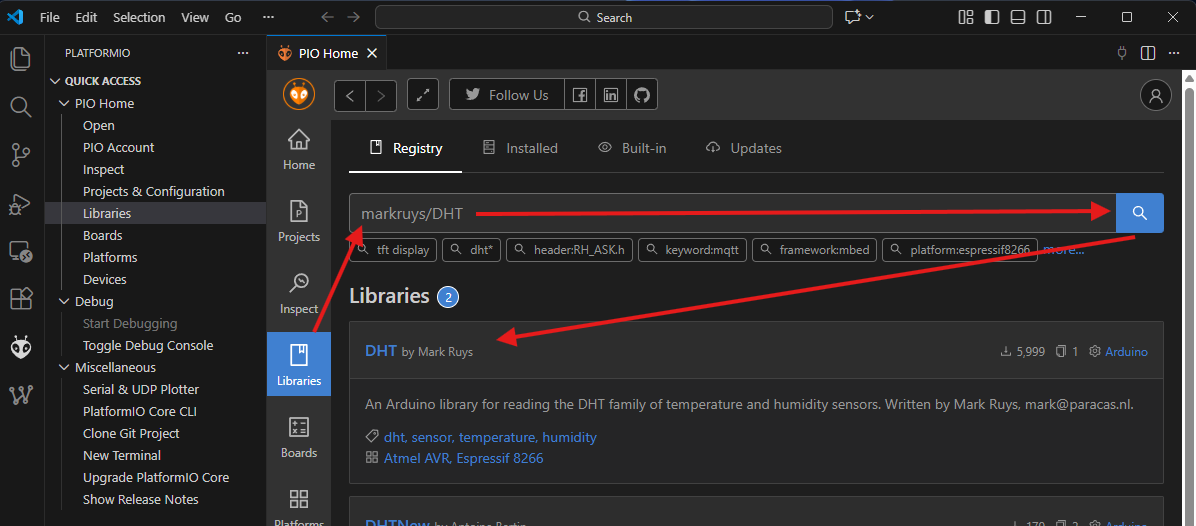
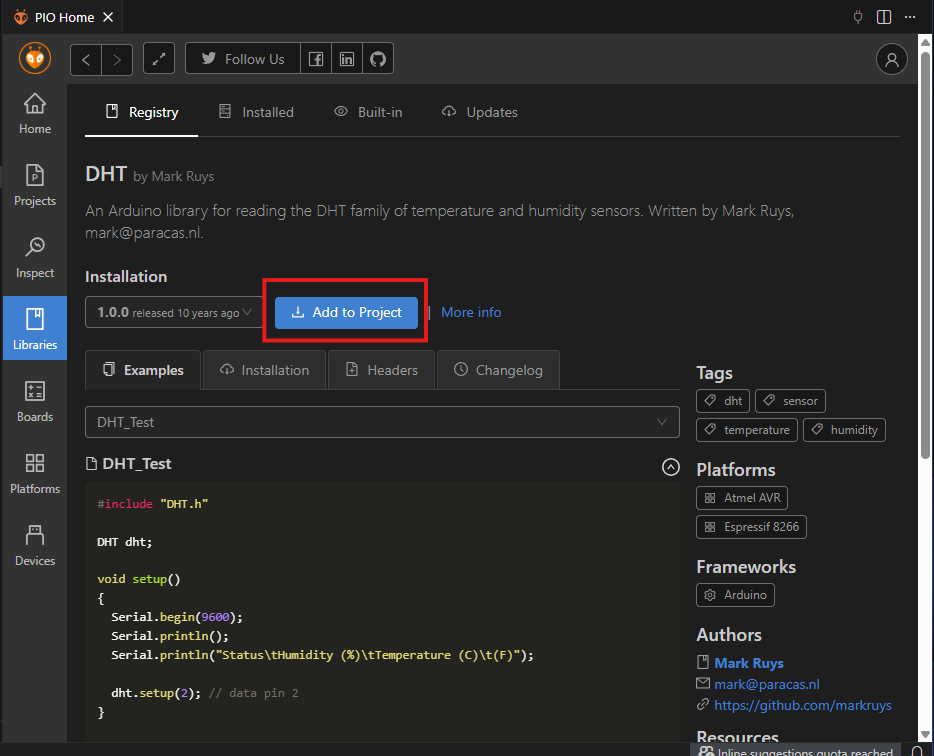
-
Via CLI command:
“pio pkg install -l <library name>”
Example:
“pio pkg install -l markruys/DHT@1.0.0” -
Via editing the projects
platformio.ini:
lib_deps =
  <library name>
  <library name>
  ...
Example:
[env:esp32dev]
platform = espressif32
board = esp32dev
framework = arduino
monitor_speed = 115200
lib_deps =
    markruys/DHT@^1.0.0
    esp32async/ESPAsyncWebServer@^3.9.4
Libraries can be installed from the PlatformIO Registry as shown above or from other sources like github:
lib_deps =
  https://github.com/ESP32Async/ESPAsyncWebServer@^3.9.4
Personally, I prefer the last 3rd option and edit my platformio.ini manually.
Please post the content of your platformio.ini so we can reproduce what you have (or should have).
for sure! the platformio.ini file says “
[env:feather32u4]
platform = atmelavr
board = feather32u4
framework = arduino
lib_deps = mbed-danjulio/RadioHead@0.0.0+sha.e69d086cb053
“
i’m more confused because all that, and the #include still doesn’t work, or am i missing something?
Thanks for the platformio.ini!
Please use pre-formatted text when posting code or logs for better readability.
This library does not match your setup!
You’re using framework “Arduino” but this library is for framework “mbed”
See PlatformIO Registry
You have to use a library that match your framework. Choose one of these: PlatformIO Registry
thank you so much! i figured out the right library to use, and it worked this time. i had no idea how it identified it’s platform, but now i do.
1 Like