Hello!
I’ve been using PlatformIO for half a year now, and in my last project I wanted to go a little bit further and to not need a bootloader. So I want to program an ATmega328P on a breadboard with a simple blink sketch, but I’m failing to do so. This is my setup:
1.-Arduino Mega 2560 has been programmed as “Arduino as ISP” using ArduinoIDE
2.- Wired this:
Arduino Mega // ATmega328P
Digital pin 51 (MOSI) // pin 17 (MOSI. Equivalent to Arduino UNO Digital pin 11)
Digital pin 50 (MISO) // pin 18 (MISO. Equivalent to Arduino UNO Digital pin 12)
Digital pin 52 (SCK) // pin 19 (SCK Equivalent to Arduino UNO Digital pin 13)
Of course I’ve fed the arduino Mega 2560 5V and ground to the breadboard
2.- I checked that it worked by programming the Blink example skectch using Arduino UNO with this setup (idk if it’s important but you can notice that I selected “Arduino UNO” as the board because Atmega328p is the microcontroller that UNO uses):
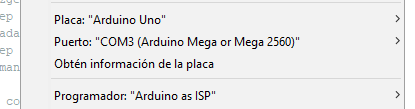
It successfully worked, so ‘Arduino as ISP’ is working properly
3.- Tried to do the same in PlatformIO, I read the documentation on ‘Upload using programmer’ (sorry, I can’t put more than 2 links bc I’m a new user), tried, failed, googled, searched in this forums, found a few topics talking about this:
Topic 1
Topic 2
I’ve tried all sorts of combinations of my platform.ini file, but it never works. This is part of the message I get when I click on the “upload” icon, Ithink it’s programming the Arduino Mega itself (every try I make I reprogram it as “arduino as ISP” using the Arduino IDE just in case):
avrdude: AVR device initialized and ready to accept instructions

Reading | ################################################## | 100% 0.01s

avrdude: Device signature = 0x1e9801 (probably m2560)
avrdude: reading input file ".pio\build\megaatmega2560\firmware.hex"
avrdude: writing flash (4592 bytes):

Writing | ################################################## | 100% 0.74s

avrdude: 4592 bytes of flash written
avrdude: verifying flash memory against .pio\build\megaatmega2560\firmware.hex:
avrdude: load data flash data from input file .pio\build\megaatmega2560\firmware.hex:
avrdude: input file .pio\build\megaatmega2560\firmware.hex contains 4592 bytes
avrdude: reading on-chip flash data:
[...]
Currently my “platformio.ini” file looks like this:
[env:ATmega328P]
platform = atmelavr
board = ATmega328P
framework = arduino
upload_protocol = custom
upload_port = COM3
upload_speed = 19200
upload_flags =
    -C
    ; use "tool-avrdude-megaavr" for the atmelmegaavr platform
    $PROJECT_PACKAGES_DIR/tool-avrdude/avrdude.conf
    -p
    $BOARD_MCU
    -P
    $UPLOAD_PORT
    -b
    $UPLOAD_SPEED
    -c
    stk500v1
upload_command = avrdude $UPLOAD_FLAGS -U flash:w:$SOURCE:i
What am I doing wrong?