I have an ESP32 project that I build with VS Code, PlatformIO and the Arduino framework. I can upload via OTA no problem using the option in the IDE and settings in platformio.ini
I have a friend who has another instance of the same PCB for this project and I’d like to send them new builds of the binary file to upload and have them do the upload using OTA. Ideally they shouldn’t need to install VSCode and PlatformIO. I’d like them to be able to upload the new file in some simple way from a windows shell command.
What would be a good way to do this?
If it’s significantly easier they could do the update using a USB connection between their Windows PC and the ESP32.
When you use the project task “Advanced → Verbose Upload”, you’ll see that an “OTA upload” just involves invoking espota.py with the binary and the target hostname / IP address. For local uploads via USB it would use esptool.py.
Espressif even offers the .exe version of the esptool.py script here and the .exe of espota.py here, so you don’t need a Python interpreter and libaries to run the tool, it’s a standalone exe.
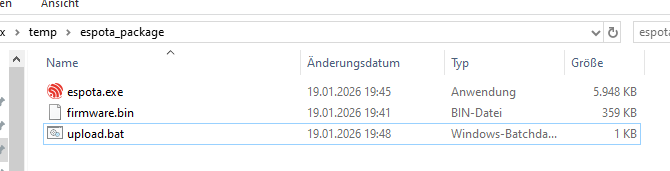
That means you can create a very simple “OTA firmware and uploader package” if you place these files in an folder:
espota.exe from the source above
firmware.bin, the firmware you want to upload (.pio/build/<env name>/firmware.bin)
upload.bat batch script which invokes espota.exe with the right parameters and expected IP address or even better, mDNS name (like esp32.local, if you setup your MDNS responder in firmware up correctly.. See docs and src)
The upload.bat can be a simple
@echo off
rem Change IP or MDNS name of your ESP device below
set IP_ADDRESS=192.168.0.123
echo Uploading firmware to ESP device at %IP_ADDRESS%
echo ================================
espota.exe --debug --progress -i %IP_ADDRESS% -f firmware.bin
rem espota.exe --debug --progress -i %IP_ADDRESS% --spiffs -f data.bin
pause
Note that, when there is also a filesystem involved (generated data.bin LittleFS, SPIFFS or whatever), it needs to be uploaded separetely with the --spiffs option. See espota.exe -h for further help.
So and entire upload package could just be this, where you double click upload.bat and it uploads the firmware (and filesystem). That’s it.