I’m exploring Zephyr. I have a supported board (SeeedStudio LoRa E5 Dev Board) and I tried the blinky and hello world examples. (using an ST-Link debug probe)
- I am able to build the applications
- I am able to download the applications
But no LED is blinking and nothing is sent on any UART 
Then I tried to debug.
I’ve set
CONFIG_THREAD_MONITOR=y
CONFIG_DEBUG_THREAD_INFO=y
in prj.conf. The debugger is connecting, but the code does not even seem to reach the first breakpoint at main()
This is the output of the debug console
Reading symbols from C:\Users\pasca\Documents\Projects\Software\Zephyr000\.pio\build\lora_e5_dev_board\firmware.elf...
Warning: 'set target-async', an alias for the command 'set mi-async', is deprecated.
Use 'set mi-async'.

PlatformIO Unified Debugger -> https://bit.ly/pio-debug
PlatformIO: debug_tool = stlink
PlatformIO: Initializing remote target...
xPack Open On-Chip Debugger 0.12.0-01004-g9ea7f3d64-dirty (2023-01-30-15:04)
Licensed under GNU GPL v2
For bug reports, read
	http://openocd.org/doc/doxygen/bugs.html
hla_swd
Info : The selected transport took over low-level target control. The results might differ compared to plain JTAG/SWD
none separate

Info : tcl server disabled
Info : telnet server disabled
Info : clock speed 500 kHz
Info : STLINK V3J14M5 (API v3) VID:PID 0483:374E
Info : Target voltage: 3.313754
Info : [stm32wlx.cpu0] Cortex-M4 r0p1 processor detected
Info : [stm32wlx.cpu0] target has 6 breakpoints, 4 watchpoints
Info : starting gdb server for stm32wlx.cpu0 on pipe
Info : accepting 'gdb' connection from pipe
[stm32wlx.cpu0] halted due to debug-request, current mode: Thread
xPSR: 0x41000000 pc: 0x1fff23f4 msp: 0x200014e8
Info : device idcode = 0x10016497 (STM32WLE/WL5x - Rev 'unknown' : 0x1001)
Info : RDP level 0 (0xAA)
Info : flash size = 256 KiB
Info : flash mode : single-bank
Info : device idcode = 0x10016497 (STM32WLE/WL5x - Rev 'unknown' : 0x1001)
Info : RDP level 0 (0xAA)
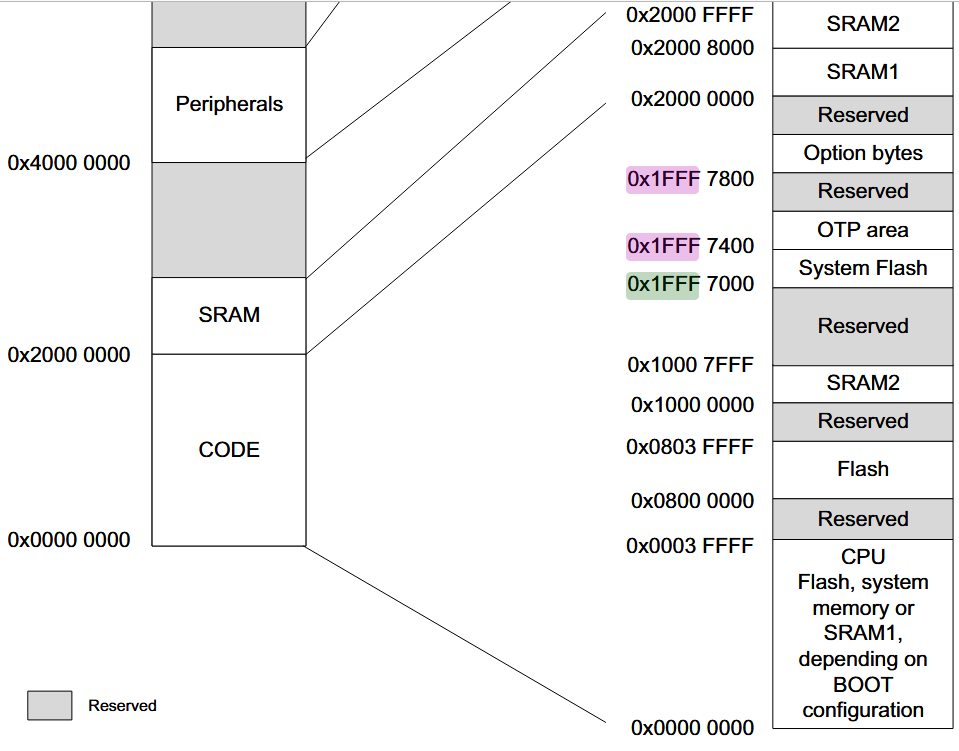
Info : OTP size is 1024 bytes, base address is 0x1fff7000
Warn : keep_alive() was not invoked in the 1000 ms timelimit. GDB alive packet not sent! (1044 ms). Workaround: increase "set remotetimeout" in GDB
0x1fff23f4 in ?? ()
2
Info : Unable to match requested speed 500 kHz, using 200 kHz
[stm32wlx.cpu0] halted due to debug-request, current mode: Thread
xPSR: 0x01000000 pc: 0x1fff2af4 msp: 0x20001500
2
Info : Unable to match requested speed 4000 kHz, using 3300 kHz
Warn : keep_alive() was not invoked in the 1000 ms timelimit. GDB alive packet not sent! (1028 ms). Workaround: increase "set remotetimeout" in GDB
Warn : keep_alive() was not invoked in the 1000 ms timelimit. GDB alive packet not sent! (1014 ms). Workaround: increase "set remotetimeout" in GDB
Loading section rom_start, size 0x138 lma 0x8000000
Loading section text, size 0x4dac lma 0x8000138
Loading section .ARM.exidx, size 0x8 lma 0x8004ee4
Loading section initlevel, size 0x80 lma 0x8004eec
Loading section device_area, size 0x180 lma 0x8004f6c
Loading section sw_isr_table, size 0x1f0 lma 0x80050ec
Loading section gpio_driver_api_area, size 0x24 lma 0x80052dc
Loading section reset_driver_api_area, size 0x10 lma 0x8005300
Loading section clock_control_driver_api_area, size 0x1c lma 0x8005310
Loading section regulator_driver_api_area, size 0x3c lma 0x800532c
Loading section uart_driver_api_area, size 0x14 lma 0x8005368
Loading section zephyr_dbg_info, size 0x44 lma 0x800537c
Loading section rodata, size 0x44c lma 0x80053c0
Loading section datas, size 0x64 lma 0x800580c
Loading section device_states, size 0x18 lma 0x8005870
Loading section .last_section, size 0x4 lma 0x8005888
Info : Padding image section 0 at 0x0800588c with 4 bytes (bank write end alignment)
2
Info : Unable to match requested speed 500 kHz, using 200 kHz
[stm32wlx.cpu0] halted due to debug-request, current mode: Thread
xPSR: 0x01000000 pc: 0x1fff2af4 msp: 0x20001500
Warn : keep_alive() was not invoked in the 1000 ms timelimit. GDB alive packet not sent! (1028 ms). Workaround: increase "set remotetimeout" in GDB
Start address 0x080005a0, load size 22668
Transfer rate: 6 KB/sec, 1333 bytes/write.
2
Info : Unable to match requested speed 500 kHz, using 200 kHz
2
Unable to match requested speed 500 kHz, using 200 kHz
[stm32wlx.cpu0] halted due to debug-request, current mode: Thread
xPSR: 0x01000000 pc: 0x1fff2af4 msp: 0x20001500
[stm32wlx.cpu0] halted due to debug-request, current mode: Thread
xPSR: 0x01000000 pc: 0x1fff2af4 msp: 0x20001500
Temporary breakpoint 1 at 0x800016c: file src\main.c, line 24.
Note: automatically using hardware breakpoints for read-only addresses.
PlatformIO: Initialization completed
PlatformIO: Resume the execution to `debug_init_break = tbreak main`
PlatformIO: More configuration options -> https://bit.ly/pio-debug
the file .platformio\packages\framework-zephyr\arch\arm\core\cortex_m\reset.S is opened
When I pause program execution, I get
Program
 received signal SIGINT, Interrupt.
0x1fff27fe in ?? ()
Any ideas what’s going on and how to solve this ?