Hi all, I’m new here and I’m trying some experiment.
I tried searching in this forum and in all the web but I can’t find anything helping me.
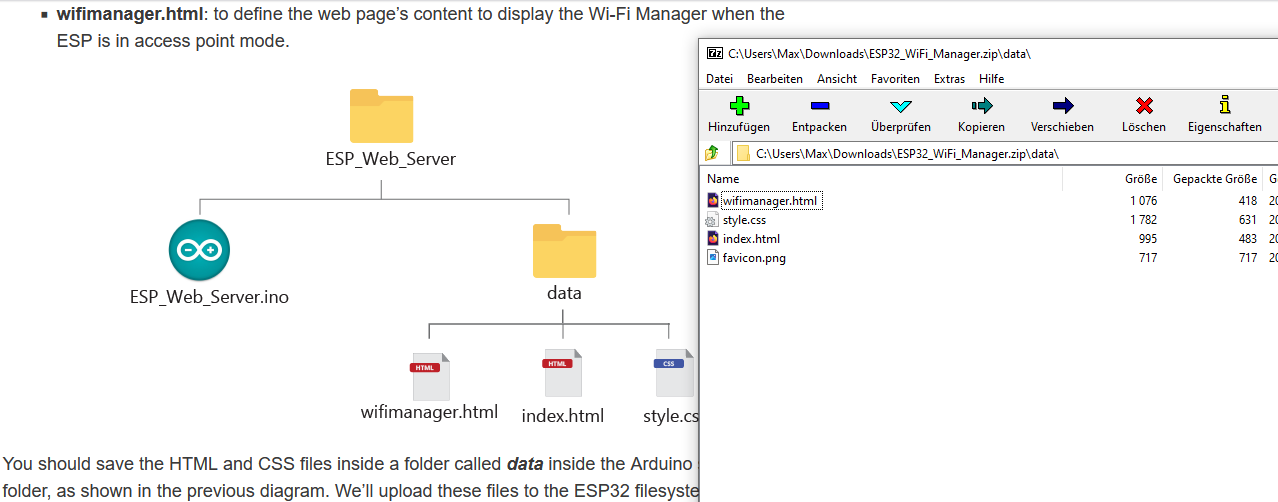
I started from this article:
https://RandomNerdTutorials.com/esp32-wi-fi-manager-asyncwebserver/
cause I’d like to interact with my ESP32 from another device, with the facility in configure the wifi connection.
I studied the code to understand his behaviour and I suppouse I din’t need to change anything.
So, what’s went right? I can compile the code correctly with no error and flash on my ESP32 (it’ an ESP32 WROOM32 on a devboard with 30 pin, how I can give you more information?). This is the output:
 *  Executing task in folder ESP_Web_server: platformio run --target upload --environment esp32dev

Processing esp32dev (platform: espressif32; board: esp32dev; framework: arduino)
----------------------------------------------------------------------------------------------------------------------------------------------------------
Verbose mode can be enabled via `-v, --verbose` option
CONFIGURATION: https://docs.platformio.org/page/boards/espressif32/esp32dev.html
PLATFORM: Espressif 32 (6.12.0) > Espressif ESP32 Dev Module
HARDWARE: ESP32 240MHz, 320KB RAM, 4MB Flash
DEBUG: Current (cmsis-dap) External (cmsis-dap, esp-bridge, esp-prog, iot-bus-jtag, jlink, minimodule, olimex-arm-usb-ocd, olimex-arm-usb-ocd-h, olimex-arm-usb-tiny-h, olimex-jtag-tiny, tumpa)
PACKAGES:
 - framework-arduinoespressif32 @ 3.20017.241212+sha.dcc1105b
 - tool-esptoolpy @ 2.40900.250804 (4.9.0)
 - tool-mkfatfs @ 2.0.1
 - tool-mklittlefs @ 1.203.210628 (2.3)
 - tool-mkspiffs @ 2.230.0 (2.30)
 - toolchain-xtensa-esp32 @ 8.4.0+2021r2-patch5
LDF: Library Dependency Finder -> https://bit.ly/configure-pio-ldf
LDF Modes: Finder ~ chain, Compatibility ~ soft
Found 36 compatible libraries
Scanning dependencies...
Dependency Graph
|-- AsyncTCP @ 3.4.9
|-- ESPAsyncWebServer @ 3.9.2
|-- FS @ 2.0.0
|-- LittleFS @ 2.0.0
|-- WiFi @ 2.0.0
Building in release mode
Compiling .pio/build/esp32dev/src/main.cpp.o
Linking .pio/build/esp32dev/firmware.elf
Retrieving maximum program size .pio/build/esp32dev/firmware.elf
Checking size .pio/build/esp32dev/firmware.elf
Advanced Memory Usage is available via "PlatformIO Home > Project Inspect"
RAM:   [=         ]  13.4% (used 43776 bytes from 327680 bytes)
Flash: [======    ]  63.8% (used 836649 bytes from 1310720 bytes)
Building .pio/build/esp32dev/firmware.bin
esptool.py v4.9.0
Creating esp32 image...
Merged 27 ELF sections
Successfully created esp32 image.
Configuring upload protocol...
AVAILABLE: cmsis-dap, esp-bridge, esp-prog, espota, esptool, iot-bus-jtag, jlink, minimodule, olimex-arm-usb-ocd, olimex-arm-usb-ocd-h, olimex-arm-usb-tiny-h, olimex-jtag-tiny, tumpa
CURRENT: upload_protocol = esptool
Looking for upload port...
Auto-detected: /dev/ttyUSB1
Uploading .pio/build/esp32dev/firmware.bin
esptool.py v4.9.0
Serial port /dev/ttyUSB1
Connecting....
Chip is ESP32-D0WDQ6 (revision v1.0)
Features: WiFi, BT, Dual Core, 240MHz, VRef calibration in efuse, Coding Scheme None
Crystal is 40MHz
MAC: 30:ae:a4:e9:f2:e8
Uploading stub...
Running stub...
Stub running...
Changing baud rate to 460800
Changed.
Configuring flash size...
Flash will be erased from 0x00001000 to 0x00005fff...
Flash will be erased from 0x00008000 to 0x00008fff...
Flash will be erased from 0x0000e000 to 0x0000ffff...
Flash will be erased from 0x00010000 to 0x000ddfff...
SHA digest in image updated
Compressed 17536 bytes to 12202...
Writing at 0x00001000... (100 %)
Wrote 17536 bytes (12202 compressed) at 0x00001000 in 0.5 seconds (effective 297.2 kbit/s)...
Hash of data verified.
Compressed 3072 bytes to 146...
Writing at 0x00008000... (100 %)
Wrote 3072 bytes (146 compressed) at 0x00008000 in 0.0 seconds (effective 595.3 kbit/s)...
Hash of data verified.
Compressed 8192 bytes to 47...
Writing at 0x0000e000... (100 %)
Wrote 8192 bytes (47 compressed) at 0x0000e000 in 0.1 seconds (effective 841.8 kbit/s)...
Hash of data verified.
Compressed 843232 bytes to 538263...
Writing at 0x00010000... (3 %)
Writing at 0x0001c0ec... (6 %)
Writing at 0x00026768... (9 %)
Writing at 0x00032901... (12 %)
Writing at 0x000386a2... (15 %)
Writing at 0x0003e266... (18 %)
Writing at 0x00043903... (21 %)
Writing at 0x0004901c... (24 %)
Writing at 0x0004e30c... (27 %)
Writing at 0x0005361c... (30 %)
Writing at 0x00058827... (33 %)
Writing at 0x0005dc5c... (36 %)
Writing at 0x00062f04... (39 %)
Writing at 0x000683eb... (42 %)
Writing at 0x0006d291... (45 %)
Writing at 0x000725f0... (48 %)
Writing at 0x0007797c... (51 %)
Writing at 0x0007d5bd... (54 %)
Writing at 0x00082ca5... (57 %)
Writing at 0x00087f1c... (60 %)
Writing at 0x0008d30c... (63 %)
Writing at 0x000927b3... (66 %)
Writing at 0x00097e37... (69 %)
Writing at 0x0009d68c... (72 %)
Writing at 0x000a3539... (75 %)
Writing at 0x000a8e8d... (78 %)
Writing at 0x000aea30... (81 %)
Writing at 0x000b7d96... (84 %)
Writing at 0x000bf23c... (87 %)
Writing at 0x000c45db... (90 %)
Writing at 0x000ce0f9... (93 %)
Writing at 0x000d39e1... (96 %)
Writing at 0x000d8f0b... (100 %)
Wrote 843232 bytes (538263 compressed) at 0x00010000 in 12.3 seconds (effective 547.1 kbit/s)...
Hash of data verified.

Leaving...
Hard resetting via RTS pin...
================================================================================= [SUCCESS] Took 32.37 seconds =================================================================================
 *  Terminal will be reused by tasks, press any key to close it.
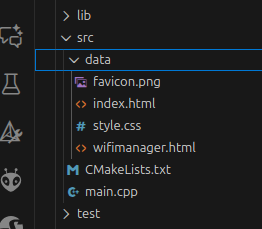
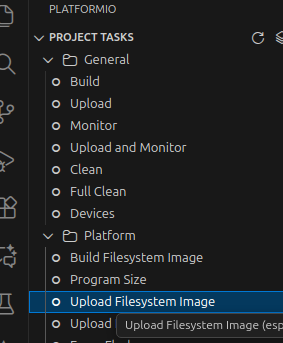
Instead, what’s went wrong? The code run correctly, but it seems the LittleFS filesystem doesn’t contain any file inside, first of all wifimanager.html (tha caption portal for configuring the wifi network to connect to).
Infact, as it starts running, the terminal gave me this messages:
rst:0x1 (POWERON_RESET),boot:0x13 (SPI_FAST_FLASH_BOOT)
configsip: 0, SPIWP:0xee
clk_drv:0x00,q_drv:0x00,d_drv:0x00,cs0_drv:0x00,hd_drv:0x00,wp_drv:0x00
mode:DIO, clock div:2
load:0x3fff0030,len:1184
load:0x40078000,len:13232
load:0x40080400,len:3028
entry 0x400805e4
LittleFS mounted successfully
Reading file: /ssid.txt
[    31][E][vfs_api.cpp:105] open(): /littlefs/ssid.txt does not exist, no permits for creation
- failed to open file for reading
Reading file: /pass.txt
[    44][E][vfs_api.cpp:105] open(): /littlefs/pass.txt does not exist, no permits for creation
- failed to open file for reading
Reading file: /ip.txt
[    57][E][vfs_api.cpp:105] open(): /littlefs/ip.txt does not exist, no permits for creation
- failed to open file for reading
Reading file: /gateway.txt
[    71][E][vfs_api.cpp:105] open(): /littlefs/gateway.txt does not exist, no permits for creation
- failed to open file for reading


Undefined SSID or IP address.
Setting AP (Access Point)
AP IP address: 192.168.4.1
Ok, no problem, ‘couse first time code was running the wifi configuration file .txt do not exist.
Then i take my phone and connect to the SSID “ESP-WIFI-MANAGER” of the AP created end I obtain the following messages in terminal:
[ 38578][E][vfs_api.cpp:105] open(): /littlefs/wifimanager.html does not exist, no permits for creation
[ 38589][E][vfs_api.cpp:105] open(): /littlefs/wifimanager.html.gz does not exist, no permits for creation
[ 38600][E][vfs_api.cpp:105] open(): /littlefs/wifimanager.html does not exist, no permits for creation
[ 38610][E][vfs_api.cpp:105] open(): /littlefs/wifimanager.html.gz does not exist, no permits for creation
 *  Terminal will be reused by tasks, press any key to close it.
I put inside some code to test the conytents of the LittleFS filesystem:
    // My control code for LittleFS
    File root = LittleFS.open("/");
    if (!root) {
    Serial.println(" - Can't open root");
    return;
    }
    Serial.println("Contents of the root");
    File file = root;
    while(file) {
      Serial.println(file.name());
      file= root.openNextFile();
    }
    Serial.println("End Contents of the root");
    // End My control code for LittleFS
and this is the messages in the terminal:
Contents of the root

End Contents of the root
It seems there isn’t any file loaded in the filesystem.
Now I show you my platformio.ini:
[platformio]
default_envs = esp32dev

[env:esp32dev]
platform = espressif32
board = esp32dev
framework = arduino
board_build.filesystem = littlefs
monitor_speed = 115200
lib_deps =
	ESP32Async/AsyncTCP
	ESP32Async/ESPAsyncWebServer
and this is the entire code:
/*********
  Rui Santos & Sara Santos - Random Nerd Tutorials
  Complete instructions at https://RandomNerdTutorials.com/esp32-wi-fi-manager-asyncwebserver/
  Permission is hereby granted, free of charge, to any person obtaining a copy of this software and associated documentation files.
  The above copyright notice and this permission notice shall be included in all copies or substantial portions of the Software.
*********/
#include <Arduino.h>
#include "FS.h"
#include <LittleFS.h>
#include <WiFi.h>
#include <AsyncTCP.h>
#include <ESPAsyncWebServer.h>

// Create AsyncWebServer object on port 80
AsyncWebServer server(80);

// Search for parameter in HTTP POST request
const char* PARAM_INPUT_1 = "ssid";
const char* PARAM_INPUT_2 = "pass";
const char* PARAM_INPUT_3 = "ip";
const char* PARAM_INPUT_4 = "gateway";

//Variables to save values from HTML form
String ssid;
String pass;
String ip;
String gateway;

// File paths to save input values permanently
const char* ssidPath = "/ssid.txt";
const char* passPath = "/pass.txt";
const char* ipPath = "/ip.txt";
const char* gatewayPath = "/gateway.txt";

IPAddress localIP;
//IPAddress localIP(192, 168, 1, 200); // hardcoded

// Set your Gateway IP address
IPAddress localGateway;

//IPAddress localGateway(192, 168, 1, 1); //hardcoded
IPAddress subnet(255, 255, 0, 0);

// Timer variables
unsigned long previousMillis = 0;
const long interval = 10000;  // interval to wait for Wi-Fi connection (milliseconds)

// Set LED GPIO
const int ledPin = 2;

// Stores LED state
String ledState;

// Initialize LittleFS
void initLittleFS() {
  if (!LittleFS.begin(true)) {
    Serial.println("An error has occurred while mounting LittleFS");
  }
  Serial.println("LittleFS mounted successfully");
}

// Read File from LittleFS
String readFile(fs::FS &fs, const char *path){
  Serial.printf("Reading file: %s\r\n", path);

  File file = fs.open(path);
  if(!file || file.isDirectory()){
    Serial.println("- failed to open file for reading");
    return String();
  }

  String fileContent;
  while(file.available()){
    fileContent = file.readStringUntil('\n');
    // break;
  }
  return fileContent;
}

// Write file to LittleFS
void writeFile(fs::FS &fs, const char *path, const char *message){
  Serial.printf("Writing file: %s\r\n", path);

  File file = fs.open(path, FILE_WRITE);
  if(!file){
    Serial.println("- failed to open file for writing");
    return;
  }
  if(file.print(message)){
    Serial.println("- file written");
  } else {
    Serial.println("- write failed");
  }
}

// Initialize WiFi
bool initWiFi() {
  if(ssid=="" || ip==""){
    Serial.println("Undefined SSID or IP address.");
    return false;
  }

  WiFi.mode(WIFI_STA);
  localIP.fromString(ip.c_str());
  localGateway.fromString(gateway.c_str());


  if (!WiFi.config(localIP, localGateway, subnet)){
    Serial.println("STA Failed to configure");
    return false;
  }
  WiFi.begin(ssid.c_str(), pass.c_str());
  Serial.println("Connecting to WiFi...");

  unsigned long currentMillis = millis();
  previousMillis = currentMillis;

  while(WiFi.status() != WL_CONNECTED) {
    currentMillis = millis();
    if (currentMillis - previousMillis >= interval) {
      Serial.println("Failed to connect.");
      return false;
    }
  }

  Serial.println(WiFi.localIP());
  return true;
}

// Replaces placeholder with LED state value
String processor(const String& var) {
  if(var == "STATE") {
    if(digitalRead(ledPin)) {
      ledState = "ON";
    }
    else {
      ledState = "OFF";
    }
    return ledState;
  }
  return String();
}

void setup() {
  // Serial port for debugging purposes
  Serial.begin(115200);

  initLittleFS();

  // Set GPIO 2 as an OUTPUT
  pinMode(ledPin, OUTPUT);
  digitalWrite(ledPin, LOW);

  // Load values saved in LittleFS
  ssid = readFile(LittleFS, ssidPath);
  pass = readFile(LittleFS, passPath);
  ip = readFile(LittleFS, ipPath);
  gateway = readFile (LittleFS, gatewayPath);
  Serial.println(ssid);
  Serial.println(pass);
  Serial.println(ip);
  Serial.println(gateway);

  if(initWiFi()) {
    // Route for root / web page
    server.on("/", HTTP_GET, [](AsyncWebServerRequest *request) {
      request->send(LittleFS, "/index.html", "text/html", false, processor);
    });
    server.serveStatic("/", LittleFS, "/");

    // Route to set GPIO state to HIGH
    server.on("/on", HTTP_GET, [](AsyncWebServerRequest *request) {
      digitalWrite(ledPin, HIGH);
      request->send(LittleFS, "/index.html", "text/html", false, processor);
    });

    // Route to set GPIO state to LOW
    server.on("/off", HTTP_GET, [](AsyncWebServerRequest *request) {
      digitalWrite(ledPin, LOW);
      request->send(LittleFS, "/index.html", "text/html", false, processor);
    });
    server.begin();
  }
  else {
    // Connect to Wi-Fi network with SSID and password
    Serial.println("Setting AP (Access Point)");
    // NULL sets an open Access Point
    WiFi.softAP("ESP-WIFI-MANAGER", NULL);

    IPAddress IP = WiFi.softAPIP();
    Serial.print("AP IP address: ");
    Serial.println(IP);

    // My control code for LittleFS
    File root = LittleFS.open("/");
    if (!root) {
    Serial.println(" - Can't open root");
    return;
    }
    Serial.println("Contents of the root");
    File file = root;
    while(file) {
      Serial.println(file.name());
      file= root.openNextFile();
    }
    Serial.println("End Contents of the root");
    // End My control code for LittleFS

    // Web Server Root URL
    server.on("/", HTTP_GET, [](AsyncWebServerRequest *request){
      request->send(LittleFS, "/wifimanager.html", "text/html");
    });

    server.serveStatic("/", LittleFS, "/");

    server.on("/", HTTP_POST, [](AsyncWebServerRequest *request) {
      int params = request->params();
      for(int i=0;i<params;i++){
        const AsyncWebParameter *p = request->getParam(i);
        if(p->isPost()){
          // HTTP POST ssid value
          if (p->name() == PARAM_INPUT_1) {
            ssid = p->value().c_str();
            Serial.print("SSID set to: ");
            Serial.println(ssid);
            // Write file to save value
            writeFile(LittleFS, ssidPath, ssid.c_str());
          }
          // HTTP POST pass value
          if (p->name() == PARAM_INPUT_2) {
            pass = p->value().c_str();
            Serial.print("Password set to: ");
            Serial.println(pass);
            // Write file to save value
            writeFile(LittleFS, passPath, pass.c_str());
          }
          // HTTP POST ip value
          if (p->name() == PARAM_INPUT_3) {
            ip = p->value().c_str();
            Serial.print("IP Address set to: ");
            Serial.println(ip);
            // Write file to save value
            writeFile(LittleFS, ipPath, ip.c_str());
          }
          // HTTP POST gateway value
          if (p->name() == PARAM_INPUT_4) {
            gateway = p->value().c_str();
            Serial.print("Gateway set to: ");
            Serial.println(gateway);
            // Write file to save value
            writeFile(LittleFS, gatewayPath, gateway.c_str());
          }
          //Serial.printf("POST[%s]: %s\n", p->name().c_str(), p->value().c_str());
        }
      }
      request->send(200, "text/plain", "Done. ESP will restart, connect to your router and go to IP address: " + ip);
      delay(3000);
      ESP.restart();
    });
    server.begin();
  }
}

void loop() {

}
So, what I’m doing wrong? Please somebody can help me