Hi everyone,
I’m running into an issue where a very simple servo test sketch works perfectly when uploaded from the Arduino IDE, but the exact same code doesn’t work when built and uploaded with PlatformIO in VS Code.
Here’s the sketch:
#include <ESP32Servo.h>

Servo myServo;

void setup() {
    myServo.attach(7);
}

void loop() {
    myServo.write(106);
}
When I upload this using the Arduino IDE, the servo moves as expected.
However, when I upload it through PlatformIO, the servo does not move at all.
Here’s what I’ve tried in platformio.ini:
;SERVO DOES NOT MOVE
;[env:esp32-c3-devkitm-1]
;platform = espressif32
;board = esp32-c3-devkitm-1
;framework = arduino
;lib_deps = madhephaestus/ESP32Servo@^3.0.8

;SERVO DOES NOT MOVE
[env:esp32-c3-devkitm-1]
platform = espressif32
board = esp32-c3-devkitm-1
board_build.mcu = esp32c3
board_build.f_cpu = 160000000L
framework = arduino
lib_deps =
    madhephaestus/ESP32Servo@^3.0.8
monitor_speed = 115200
build_flags =
    -D ARDUINO_USB_MODE=1
    -D ARDUINO_USB_CDC_ON_BOOT=1
    -D ARDUINO_ESP32C3_DEV=1
    -D CONFIG_DISABLE_HAL_LOCKS=1
    -D ESP32_C3=1
    -D BOARD_HAS_PSRAM
    -D ARDUINO_FLASH_MODE_QIO=1
    -D ARDUINO_FLASH_FREQUENCY=80
    -D ARDUINO_PARTITION_DEFAULT_4MB=1
upload_speed = 921600
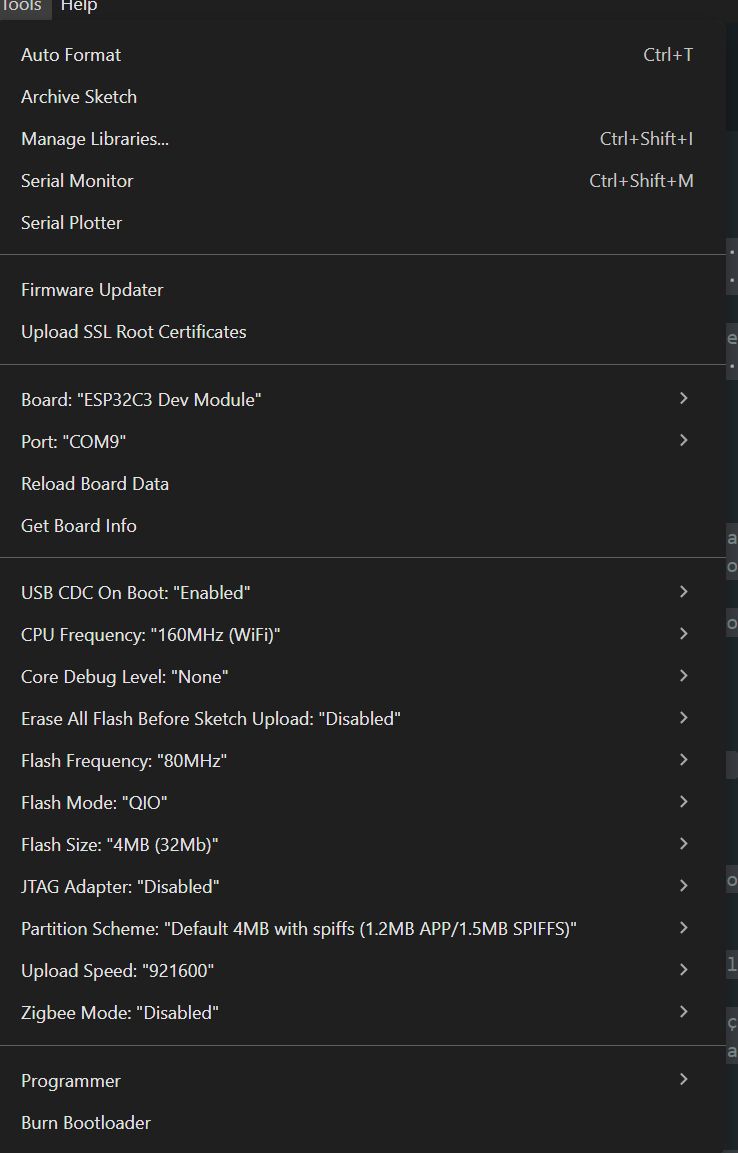
My question is:
What am I missing in the PlatformIO setup that prevents this exact same code from working, even though it runs fine from the Arduino IDE?
Thanks in advance!
