I’m having trouble getting a Pico 2 to work with the RPi debug probe using the PlatformIO plugin on VS Code, as the debug console always hangs at the
PlatformIO: Initializing remote target…
stage when a debug session is started.
My platformio.ini file is:
[env:pico]
platform = https://github.com/maxgerhardt/platform-raspberrypi.git
board = rpipico2
framework = arduino
board_build.core = earlephilhower

upload_protocol = cmsis-dap
debug_tool = cmsis-dap
debug_speed = 5000

build_flags =
     -D ARDUINO_RASPBERRY_PI_PICO
     -D ARDUINO_ARCH_RP2040

debug_port = /dev/tty.usbmodem1102
Both the yellow and green LEDs are on for the 'D" port of the debug probe, so the probe can see the Pico, but apart from a brief flash the ‘U’ port LEDs are out. On the ‘Devices’ window of PlatformIO both the Pico and the Debug Probe are showing as USB connections.
Programs upload and run on the Pico without problems, it’s the debug that’s the issue.
Starting a debug session with the blink program running gives the following output…
undefinedOpen On-Chip Debugger 0.12.0+dev-gebec9504d-dirty (2024-08-27-20:00)
Licensed under GNU GPL v2
For bug reports, read
	http://openocd.org/doc/doxygen/bugs.html
4
Info : Hardware thread awareness created
cortex_m reset_config sysresetreq
adapter speed: 5000 kHz
Info : Listening on port 6666 for tcl connections
Info : Listening on port 4444 for telnet connections
Info : Using CMSIS-DAPv2 interface with VID:PID=0x2e8a:0x000c, serial=E663B03597227C26
Info : CMSIS-DAP: SWD supported
Info : CMSIS-DAP: Atomic commands supported
Info : CMSIS-DAP: Test domain timer supported
Info : CMSIS-DAP: FW Version = 2.0.0
Info : CMSIS-DAP: Interface Initialised (SWD)
Info : SWCLK/TCK = 0 SWDIO/TMS = 0 TDI = 0 TDO = 0 nTRST = 0 nRESET = 0
Info : CMSIS-DAP: Interface ready
Info : clock speed 5000 kHz
Info : SWD DPIDR 0x4c013477
Info : [rp2350.dap.core0] Cortex-M33 r1p0 processor detected
Info : [rp2350.dap.core0] target has 8 breakpoints, 4 watchpoints
Info : [rp2350.dap.core0] Examination succeed
Info : [rp2350.dap.core1] Cortex-M33 r1p0 processor detected
Info : [rp2350.dap.core1] target has 8 breakpoints, 4 watchpoints
Info : [rp2350.dap.core1] Examination succeed
Info : starting gdb server for rp2350.dap.core0 on 3333
Info : Listening on port 3333 for gdb connections
Reading symbols from /Users/phildiggens/Documents/PlatformIO/Projects/Blink/.pio/build/pico/firmware.elf...
Warning: 'set target-async', an alias for the command 'set mi-async', is deprecated.
Use 'set mi-async'.

PlatformIO Unified Debugger -> https://bit.ly/pio-debug
PlatformIO: debug_tool = cmsis-dap
PlatformIO: Initializing remote target...
… and that’s it. Setting breakpoints or monitors in the code has no effect so I’m assuming that the debug has failed to initialise
I’m assuming it’s not a hardware issue as the 3 wires from the debug go straight to the Pico as in the documentation
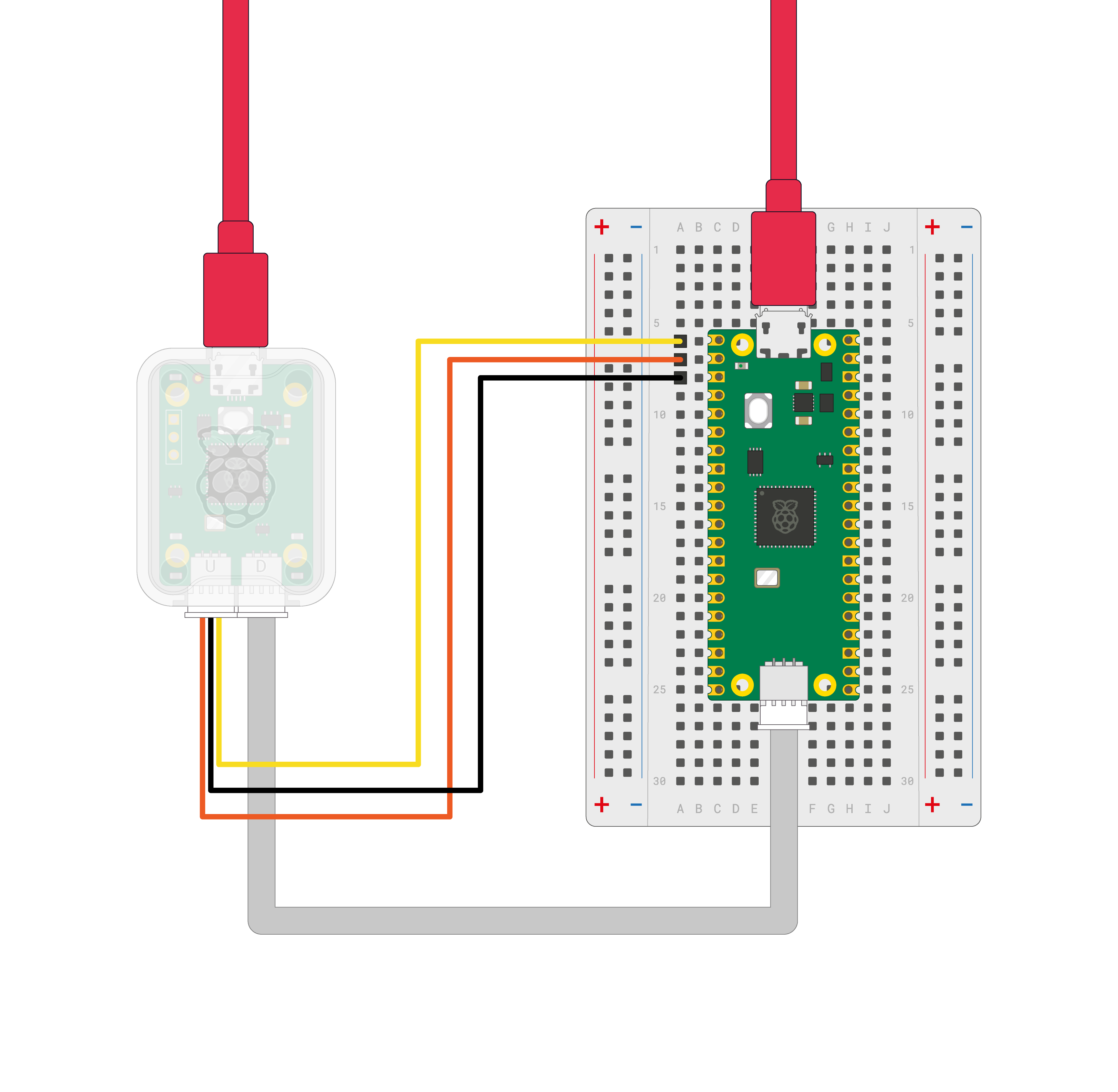
so it’s more likely to be a software/config problem? Does anyone have experience with this setup?
Thanks