Hi,
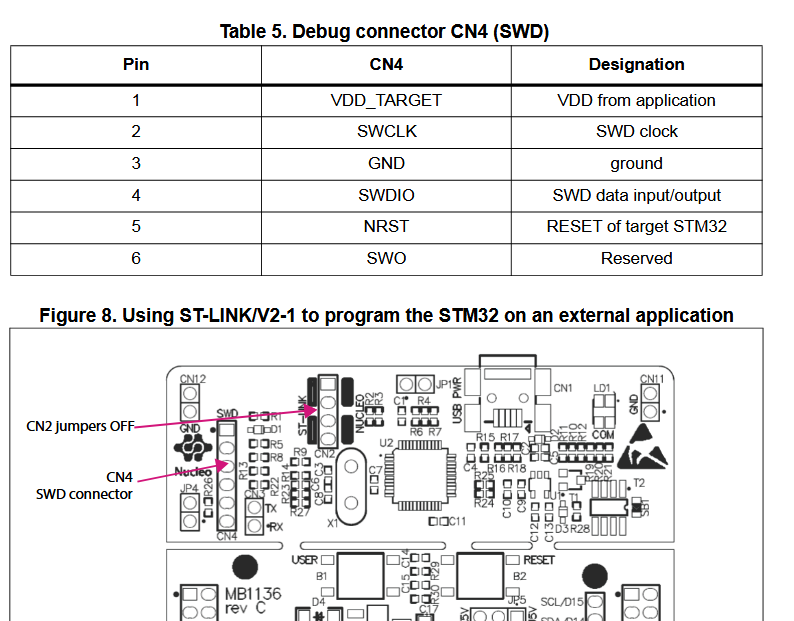
I’m trying to upload my program to Ebyte E80 test kit (which contains STM32F103C8T6, attached the schematics) using ST-Link on board Nucleo-F411RE.
Ebyte E80 test kit schematics:
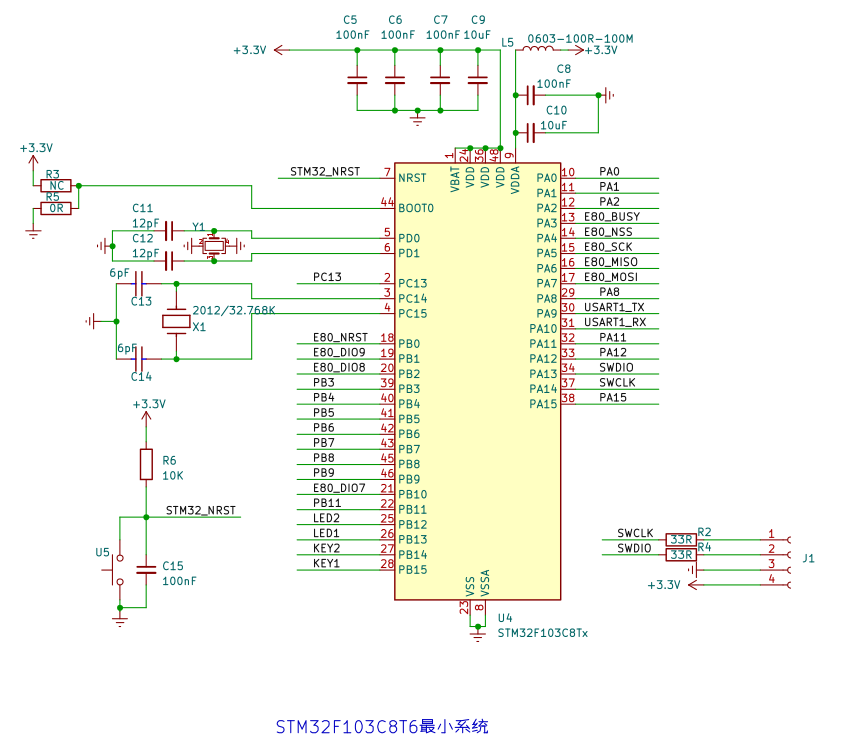
On ST NUCLEO board, I removed jumpers from CN2 and connected CN4 pins to J1 from the E80 test kit in the following way:
Pin 1 from ST NUCLEO (VDD_TARGET) to pin 4 in E80 (J1)
Pin 2 from ST NUCLEO (SWCLK) to pin 1 in E80 (J1)
Pin 3 from ST NUCLEO (GND) to pin 3 in E80 (J1)
Pin 4 from ST NUCLEO (SWDIO) to pin 2 in E80 (J1)
I powered up both boards (using USB-C in the E80 test kit and USB in ST NUCLEO) and tried uploading the program, but OpenOCD command failed to connect the target (the probe itself was detected successfully). Here are logs:
My platformio.ini:
[env:genericSTM32F103C8]
platform = ststm32
board = genericSTM32F103C8
framework = stm32cube

monitor_speed = 115200
Output from openocd:
AVAILABLE: blackmagic, cmsis-dap, dfu, jlink, serial, stlink
CURRENT: upload_protocol = stlink
openocd -d2 -s /home/developer/.platformio/packages/tool-openocd/openocd/scripts -f interface/stlink.cfg -c "transport select hla_swd" -f target/stm32f1x.cfg -c "program {.pio/build/genericSTM32F103C8/firmware.elf}  verify reset; shutdown;"
xPack Open On-Chip Debugger 0.12.0-01004-g9ea7f3d64-dirty (2023-01-30-15:03)
Licensed under GNU GPL v2
For bug reports, read
        http://openocd.org/doc/doxygen/bugs.html
debug_level: 2

hla_swd
Info : The selected transport took over low-level target control. The results might differ compared to plain JTAG/SWD
Info : clock speed 1000 kHz
Info : STLINK V2J30M19 (API v2) VID:PID 0483:374B
Info : Target voltage: 3.263559
Error: init mode failed (unable to connect to the target)
in procedure 'program'
** OpenOCD init failed **
shutdown command invoked

*** [upload] Error 1
I was wondering if that might be due to reset, so I tried pushing and holding Reset (U5) button before uploading the program, but it also failed. I even tried connecting NRST (pin 5) from CN4 in Nucleo board to “STM32_NRST” pin in the E80 test board, but it failed as well.
I tried programming STM32F411 in the Nucleo board itself (with CN2 jumpers on) and it worked fine.
Do you have any suggestions how to upload the program to the E80 board?
BR,
Adrian