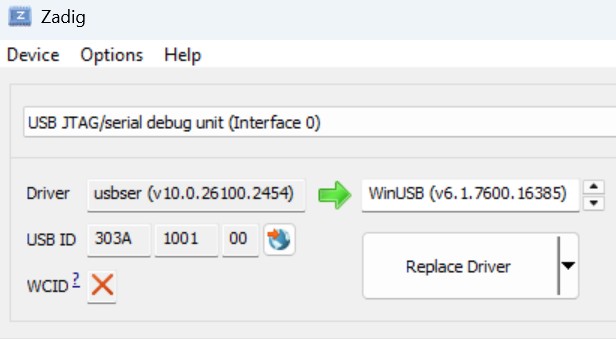
Hi all - I am trying to upload to esp32-c3 using the native usb connection. On the PC, I have WinUSB on interface 2 and regular usbser on interface 0. ESPConnect is able to connect, and can upload firmware.bin and also monitor no problem. But pio run -t upload is not working. I must be missing something on my setup. (platformio is the latest version). Any pointers would be appreciated!
Looking for upload port…
Using manually specified: COM11
Uploading .pio\build\esp32c3\firmware.bin
esptool.py v4.5.1
Serial port COM11
Connecting…
A serial exception error occurred: Write timeout
my platformio.ini:
[env:esp32c3]
platform = espressif32@6.5.0
board = esp32-c3-devkitm-1
framework = espidf
monitor_speed = 115200
monitor_port = COM11
upload_protocol = esptool
upload_port = COM11
Why did you mess around with WinUSB? This is not necessary at all!
This is outdated! The latest official PlatformIO Espressif32 platform is 6.12.0.
Connect your C3 to your PC and check the Serial COM ports in windows device manager. The C3 should show up as a serial port. Use that port to upload your code.
I can see the serial com11 appear when I connect. I looked it up on google and it said “For ESP32-like chips, USB Serial/JTAG Interface 0 is for the standard serial console (COM port) using the USB Serial (CDC) driver (for monitoring/uploading), while Interface 2 is for the JTAG debugger (OpenOCD/GDB), requiring the WinUSB driver (for advanced debugging/flashing), with Zadig tool often used to assign these drivers correctly to separate virtual interfaces on the same chip. “
So Com11 appears and ESPConnect is able to connect through Com11 no problem. Its the platformio upload that is unable to write to it for some reason. Monitor does open it (or at least it doesn’t complain that it can’t open the port) but no logs come out. When I monitor on ESPConnect, the monitor works fine as well.
I am not sure why platformio is not able to connect.
Have you tried to put the chip into the boot mode manually?
Press and hold the BOOT button while pressing the RESET button.
Wait a few seconds until the COM port is detected by windows again (it might have a different COM port number).
Try to upload again. Does it work?
Yes tried that and that didn’t work either. I am upgrading to 6.12 now to see whether that makes a difference. Again, though with the same drivers, board and comport, ESP Connect manages to upload and monitor perfectly fine (without manual boot mode) which leads me to believe the issue is elsewhere. When platformio tries to upload, I can see that it resets the board (I have some led’s that light up upon reset) but then it is unable to follow through with upload.
Is it possible that you have a monitor window open that is holding the port open?
Grown up OSes return a sensible “device busy” error to open(), but Windows does something else. Maybe it’s this. One of the reasons I refuse to use the PlatformIO gui is because it makes it too easy to leave a monitor open after a partially successful run, which will then send the following build and run cycle down in flames, meaning you’re always having to play whack-a-mole with some little window that you weren’t even interacting with. It just seems to lack coordination to close or reuse the first upload/monitor before trying to run a second one of either.
If you can’t find it, and I know this sounds like tired advice, reboot. That’ll at least ensure you don’t have two processes (like a monitor and an upload) both trying to use the same serial device.
the upload issue is fixed - I basically upgraded to the last platformio framework. For some reason, monitor still doesn’t work (doesn’t display anything but doesn’t complain about connecting either)
If you’re on ESP-IDF you need to configure USB CDC.
If you’re on Arduino and want to use the Serial object you need to set
build_flags =
  -DARDUINO_USB_CDC_ON_BOOT=1
  -DARDUINO_USB_MODE=1
in the platformio.ini
Thanks but I am on esp-idf. What would be the platform.ini equivalent for that please?
[and will it mess up the uploads or just fix monitoring]
Thanks!
ESP-IDF must be configured via sdk-config.
Open a terminal and enter pio run -t menuconfig
I don’t know the exact settings. Please check Espressifs documentation.