Hi Max,
took a while to get things done!
I went through all things you required step-by-step.
I installed the program minGW-W64 and have set the path:
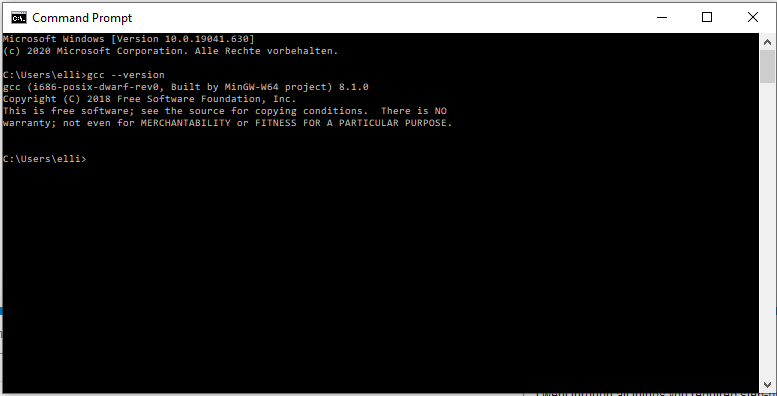
Then I have cleaned up VSCode and started from scratch. After finishing and cbuilding with pio - Error: “CC” written wrong or could not be found.
Then I edited the path for gcc in platformio.ini and error again - but different!
See the screenshot and the build -messages:

> Executing task in folder Marlin-2.0.7.2-SKR-E3-DIP: C:\Users\elli\.platformio\penv\Scripts\pio.exe run <

Warning! Ignore unknown configuration option `custom_gcc` in section [platformio]
Processing STM32F103RC_btt_USB (platform: ststm32@~6.1; board: genericSTM32F103RC; framework: arduino)
----------------------------------------------------------------------------------------------------------------------------------------------------Verbose mode can be enabled via `-v, --verbose` option
CONFIGURATION: https://docs.platformio.org/page/boards/ststm32/genericSTM32F103RC.html
PLATFORM: ST STM32 (6.1.1) > STM32F103RC (48k RAM. 256k Flash)
HARDWARE: STM32F103RCT6 72MHz, 48KB RAM, 256KB Flash
DEBUG: Current (blackmagic) External (blackmagic, jlink, stlink)
PACKAGES:
 - framework-arduinoststm32-maple 2.10000.200103 (1.0.0)
 - tool-stm32duino 1.0.2
 - toolchain-gccarmnoneeabi 1.70201.0 (7.2.1)
LDF: Library Dependency Finder -> http://bit.ly/configure-pio-ldf
LDF Modes: Finder ~ chain, Compatibility ~ soft
Found 31 compatible libraries
Scanning dependencies...
Dependency Graph
|-- <SoftwareSerialM> 1.0.0
|-- <USBComposite for STM32F1> 0.91
|-- <TMCStepper> 0.7.1
|   |-- <SoftwareSerialM> 1.0.0
|-- <U8glib-HAL> 0.4.3
|   |-- <Wire> 1.0
|-- <Wire> 1.0
|-- <FreeRTOS701>
|-- <EEPROM>
|-- <Servo(STM32F1)> 1.1.2
|-- <STM32ADC> 1.0
Building in release mode
Compiling .pio\build\STM32F103RC_btt_USB\FrameworkArduinoVariant\board.cpp.o
Der Befehl "arm-none-eabi-g++" ist entweder falsch geschrieben oder
konnte nicht gefunden werden.
Compiling .pio\build\STM32F103RC_btt_USB\FrameworkArduinoVariant\wirish\boards.cpp.o
Der Befehl "arm-none-eabi-g++" ist entweder falsch geschrieben oder
konnte nicht gefunden werden.
Compiling .pio\build\STM32F103RC_btt_USB\FrameworkArduinoVariant\wirish\boards_setup.cpp.o
Der Befehl "arm-none-eabi-g++" ist entweder falsch geschrieben oder
konnte nicht gefunden werden.
Compiling .pio\build\STM32F103RC_btt_USB\FrameworkArduinoVariant\wirish\start.S.o
*** [.pio\build\STM32F103RC_btt_USB\FrameworkArduinoVariant\board.cpp.o] Error 1
*** [.pio\build\STM32F103RC_btt_USB\FrameworkArduinoVariant\wirish\boards.cpp.o] Error 1
*** [.pio\build\STM32F103RC_btt_USB\FrameworkArduinoVariant\wirish\boards_setup.cpp.o] Error 1
Der Befehl "arm-none-eabi-gcc" ist entweder falsch geschrieben oder
konnte nicht gefunden werden.
*** [.pio\build\STM32F103RC_btt_USB\FrameworkArduinoVariant\wirish\start.S.o] Error 1
=========================================================== [FAILED] Took 12.10 seconds ===========================================================

Environment          Status    Duration
-------------------  --------  ------------
STM32F103RC_btt_USB  FAILED    00:00:12.098
====================================================== 1 failed, 0 succeeded in 00:00:12.098 ======================================================
The terminal process "C:\Users\elli\.platformio\penv\Scripts\pio.exe 'run'" terminated with exit code: 1.

Terminal will be reused by tasks, press any key to close it.
What to try next!?
Best Regards
Hans