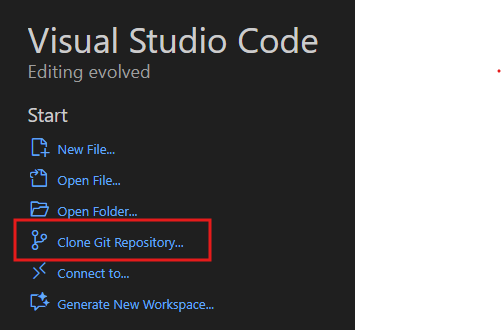
I have an own git server. Need to restore a deleted project, not from GITHUB but from my own server
PIO seams to leed me to GITHUB, whatever an URl I enter.
need an hint
thank you.
I have an own git server. Need to restore a deleted project, not from GITHUB but from my own server
PIO seams to leed me to GITHUB, whatever an URl I enter.
need an hint
thank you.
And how do you see that? What exact buttons do you press that makes an error message pop up that? What’s the platformio.ini?
It asks me for GitHub Credentials.
in the left column under Miscellaneous i go to Clone Git Project and on the Top
I enter the full ssh Path to m< server. my be thats wrong. I am working with PIO since years and Icappreciate our fantastic work. It is the first time I have to bring back a total project and not only a previous version or switch branch.
A screenshot or example URL may help.
Kind Regards
That’s just a short-link to VS Code’s built-in git.clone command (available if git is installed):
gitlab.com.)
Do not click on “Clone from GitHub”
Thank you that helps, but what when the project is not on GitHub but on my local Debian12 server.
myserver.mylocaldomain:/srv/git/projectname.git
the projectname.git directory is created with the following script
<#!/bin/bash
if [ “$1” == “” ]
then
echo “kein Project”
echo “Usage:”
echo “makegit.sh ohne .git!”
exit 1
fi
PROJECT=“$1”
echo “Create $PROJECT.git, continue (y/N)”
read ok
if [ “$ok” != “y” ]
then
echo “Leeaving!”
exit 1
fi
mkdir $PROJECT.git
echo “Project $PROJECT.git generated”
git init --bare $PROJECT.git
echo “Project DIR initialized”
echo “Content off current”
ls -la
echo “Content of $PROJECT.git”
ls -la $PROJECT.git
echo “Command to execute in vscode to add remote”
echo " git remote add origin ssh://git@myserver.mydomain.de:/srv/git/$PROJECT.git"
echo “Finish”/>
Kind Regards and thank for the patience with me
Should be no problem if it is a git server.
How do you usually use repositories on your server?
I do my projects on my iMac and publish them to that Debian server, that hosts a WIkI webserver and a picture webserver too plus it acts as a backup server for this and that too.
It is a VM under PROXMOX and daily backuped to a PROXMOX Backup server.
For PIO I see it as a Backup server, to be able to restore (clone) restore accidentliy deleteted local projects.
On that server there is a User git beside me and root and has all rights to /srv/git and a /home/git/projects directory linked to /srv/git
I Installed this structure years before folloing a description or tutorial do no more know from where.
KInd Regards and thank you again for your help.
Does your server also host a real git server?
I’m just asking because you mentioned webserver, picture webserver, backupserver and some path names but nothing git related.
Usually you don’t access git repositories directly via path and filenames but by using the git command via the cli. Fortunately VS Code makes git more easy to use via it’s GUI as shown in in the screenshots.
To clone a git repository via the cli, all you need is the command git clone <url>
thank you , I will go in that dokument