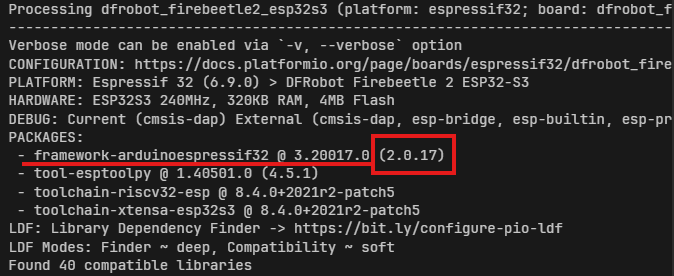
I am getting the following error every time PlatformIO tries to build anything:
Error: Failed to install Python dependencies (exit code: 2)
Error: Failed to install Python dependencies into penv
The error happens with any project, even a simple “esp32dev” test project using the official espressif32 platform. PlatformIO is unable to install its Python dependencies
into the virtual environment (penv) under any situation (my guess).
Uninstalled PlatformIO completely with “pip uninstall platformio”
Deleted the entire folder: C:\Users\joine\.platformio
Reinstalled PlatformIO fresh with “pip install platformio” and installer script
Removed Python 3.13 from the system
Installed Python 3.10.0 cleanly and added it to PATH
Verified that Python, pip, and py all point to Python 3.10 and not Python 3.13
Confirmed that “pio --version” works and PlatformIO Core is functional
Confirmed that “pio system info” shows valid Python executable inside penv
Problem summary:
PlatformIO successfully creates penv, but fails when installing the Python dependencies into that environment.
The error always happens, no matter which project or which platform I use. The error message does not include
a detailed traceback, only:
Error: Failed to install Python dependencies (exit code: 2)
Error: Failed to install Python dependencies into penv
project from building.
All references I’m seeing to this are from PIOArduino (the espressif32 fork that has a more up-to-date Arduino core etc.), not from the official espressif32 platform.
oh gosh you are right, after using platform = espressif32@6.12.0 it finally worked but now i have compiling issues since like you said i used a more newer version of arduino… is there any work around like almost every file has a error? thanks for the help sorry
Please file an issue in https://github.com/pioarduino/platform-espressif32/issues if PIOArduino throws that Failed to install Python dependencies into penv error. Sadly the exception doesn’t print the exact cause (or the output from the command it tried…), so we can’t further analyze it.
Also make sure to fullfill the requirements. You definitely need git installed.
I checked their github and saw tons of open issues with that same error, im guessing its nothing new, tried also using some few old versions which also dosnt work right so weird honestly, but thank you so much and yes got git and all the requirements installed, i guess i need to recode some files, hope i dont have any big stuff gone. but thank you so much really helpful atleast i now have a different issue to work on haha
Where? There are only 4 open issues. The only direct reference to the error that I can find is
And if you want to use Pioarduino, it might be worth a try to install the PIOArduino extension instead of the PlatformIO IDE extension in VSCode, after of course deleting the entire .platformio folder again.
After talking to a PIOArduino moderator, he told me to first uninstall the PlatformIO folders and everything related, and then install the PIOArduino extension in VS Code. The extension installs all the required components that were probably missing when using the platform link or whatever.
But it worked after installing it through VS Code, I could use it in my IDE of choice (CLion). I had to recode most of the project since I now have the latest version of PIOArduino, with (I think) Arduino 3 or whatever, but yeah.
If you want to get some help, you need to provide little more details like OS, Python version installed, used Editor, PlatformIO or Pioarduino and so on.
The error is well known and reproducible since months,
sometimes it happen, sometimes not.
sometimes GitHub stops responding to PlatformIO tools and PlatformIO became unusable with this error:
“Failed to install Python dependencies into penv”
Yes, but it is a matter of different combinations like OS etc etc. I don’t have such issues. So let us know more details about your system / components used.