Hello everyone,
I recently have designed and ordered a custom PCB with an ESP32-WROOM-32D on it. Now whenever I try to upload code i get this error message: A fatal error occurred: Failed to connect to ESP32: No serial data received. I am using a CP2102 USB-to-TTL Module for Programming, and have installed the necessary drivers for it. I am guessing my schematic is wrong but to me it looks fine. Anyone know what to do?
(Program I want to upload is empty just for testing)
Thank’s in advance
Open the serial monitor in PlatformIO (baud is already correct at 115200 baud) and press the reset button (or power cycle the board). Is there any output at all? If not, also after switching RX and TX?
You might want to consider adding an auto-reset circuit so that you don’t have to do the IO0-GND → Reset sequence to boot into bootloader mode, as described in many resources like
Hi All,
i would like ask help me to upload the program. i have an esp32-s3wroom-1 dev modul (aliexpress)
i am a beginner for platformio too.
few week working right the upload but now i dont have any idea about what can i doing.
i try to press different method the buttons reset and boot but not started the upload.
LDF: Library Dependency Finder → https://bit.ly/configure-pio-ldf
LDF Modes: Finder \~ chain, Compatibility \~ soft
Found 36 compatible libraries
Scanning dependencies…
Dependency Graph
|-- Adafruit AS5600 Library @ 1.0.0
|-- Adafruit Unified Sensor @ 1.1.15
|-- Wire @ 2.0.0
Building in release mode
Retrieving maximum program size .pio/build/esp32-s3-devkitc-1/firmware.elf
Checking size .pio/build/esp32-s3-devkitc-1/firmware.elf
Advanced Memory Usage is available via “PlatformIO Home > Project Inspect”
RAM:   \[=         \]   5.9% (used 19240 bytes from 327680 bytes)
Flash: \[=         \]   9.0% (used 301465 bytes from 3342336 bytes)
Configuring upload protocol…
AVAILABLE: cmsis-dap, esp-bridge, esp-builtin, esp-prog, espota, esptool, iot-bus-jtag, jlink, minimodule, olimex-arm-usb-ocd, olimex-arm-usb-ocd-h, olimex-arm-usb-tiny-h, olimex-jtag-tiny, tumpa
CURRENT: upload_protocol = esptool
Looking for upload port…
Using manually specified: /dev/ttyACM0
Uploading .pio/build/esp32-s3-devkitc-1/firmware.bin
esptool.py v4.9.0
Serial port /dev/ttyACM0
Connecting…

A fatal error occurred: Failed to connect to ESP32-S3: No serial data received.
For troubleshooting steps visit: https://docs.espressif.com/projects/esptool/en/latest/troubleshooting.html
\*\*\* \[upload\] Error 2
========================================= \[FAILED\] Took 11.13 seconds ======
i remove all circuits only the esp32-s3 devkitc1.
could you please support me step by step.? or maybe private email discuss.
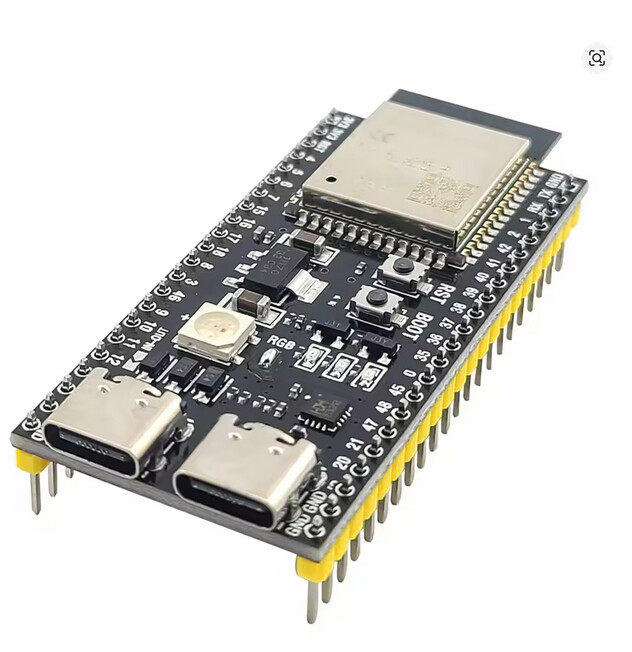
Note that it has two USB-C ports. Try using the one labeled “UART”. Remove any upload_port = .. line in your platformio.ini if you have it, to enable auto-detection of the port. You can also explicitly put the board in bootloader mode by holding down the BOOT button, pressing and releasing the RST button (while BOOT is pressed), then releasing the BOOT button.
the buttons rst and boot different pressing tried some time. what time need to release buttons when connected the usb or power on? or when started the program upload ? or during the try to connecting the platformio to esp32 and connecting …….. 1uF but not changing. between rst and gnd
the circuit all items removed from esp32
the next circumstance is that warm the cover of processor.
the next esp32 i afraid to trying
can i have your email address to continue my support discuss?
my address is fatter2323@gmail.com
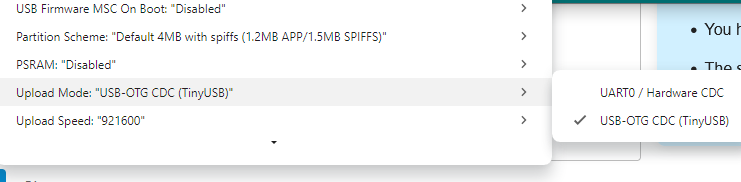
If you plug the USB-C cable into the other USB-C port (labeled “USB” on the backside) and use the regular Arduino IDE to upload via the USB bootloader, does it work?
the other (what is warm temperature a few seconds)did not uploaded so i think this is dead. Thank you very much your support.
can i try to go to platformio again? or need to any parameter settings in the platform.ini? i mean upload speed or any other
Hello,
my problem is actual again.
i use platformio in vc code i create a project compiled is fine without error. i want to upload into my esp32-s3-devkitc but only waiting the port.
after tried a few times but can not upload. i pressing the en and boot buttons but not happen nothing.
i doing into procedure arduino ide what your advised and the uploaded working success (only blink).
could you tell me what i doing wrong in platformio?
i now trying to create program in the arduino ide.
thank you in advance!

 . Thank you very much for your time and help max
  . I hope the rest of the project goes smoothly now.