Esp32s3 zero, Platformio trying to change the MAC address --> error: 'class WiFiClass' has no member named 'STA'

Hello i am trying to flash some code to my esp32-s3 zero waveshare to change the default mac address. I found this code.

/*
  Rui Santos & Sara Santos - Random Nerd sTutorials
  Complete project details at https://RandomNerdTutorials.com/get-change-esp32-esp8266-mac-address-arduino/
  Permission is hereby granted, free of charge, to any person obtaining a copy of this software and associated documentation files.
  The above copyright notice and this permission notice shall be included in all copies or substantial portions of the Software.
*/
#include <WiFi.h>
#include <esp_wifi.h>

// Set your new MAC Address
uint8_t newMACAddress[] = {0x32, 0xAE, 0xA4, 0x07, 0x0D, 0x66};

// Replace with your network credentials
const char *ssid = "REPLACE_WITH_YOUR_SSID";
const char *password = "REPLACE_WITH_YOUR_PASSWORD";

void readMacAddress()
{
  uint8_t baseMac[6];
  esp_err_t ret = esp_wifi_get_mac(WIFI_IF_STA, baseMac);
  if (ret == ESP_OK)
  {
    Serial.printf("%02x:%02x:%02x:%02x:%02x:%02x\n",
                  baseMac[0], baseMac[1], baseMac[2],
                  baseMac[3], baseMac[4], baseMac[5]);
  }
  else
  {
    Serial.println("Failed to read MAC address");
  }
}

void setup()
{
  Serial.begin(115200);
  Serial.println();

  WiFi.mode(WIFI_STA);
  WiFi.STA.begin();

  Serial.print("[DEFAULT] ESP32 Board MAC Address: ");
  readMacAddress();

  // Change ESP32 Mac Address
  esp_err_t err = esp_wifi_set_mac(WIFI_IF_STA, &newMACAddress[0]);
  if (err == ESP_OK)
  {
    Serial.println("Success changing Mac Address");
  }

  // Read the new MAC address
  Serial.print("[NEW] ESP32 Board MAC Address: ");
  readMacAddress();
}

void loop()
{
}

this works when i use the arduino ide. But i need to run this code though the platfomrio ide to intigrade it to a bigger project. When i try that i get this error:

src/main.cpp: In function 'void setup()':
src/main.cpp:39:8: error: 'class WiFiClass' has no member named 'STA'
   WiFi.STA.begin();
        ^~~
*** [.pio\build\esp32-s3-devkitc-1\src\main.cpp.o] Error 1

this is my .pio file

[env:esp32-s3-devkitc-1]
platform = espressif32
board = esp32-s3-devkitc-1
framework = arduino
monitor_speed = 115200

board_upload.flash_size = 4MB
board_build.partitions = default.csv
build_flags = 
	-DARDUINO_USB_CDC_ON_BOOT=1
	-DBOARD_HAS_PSRAM
	-D esp32_s3_devkitc_1

in arduino the board manager esp version is 3.1.1

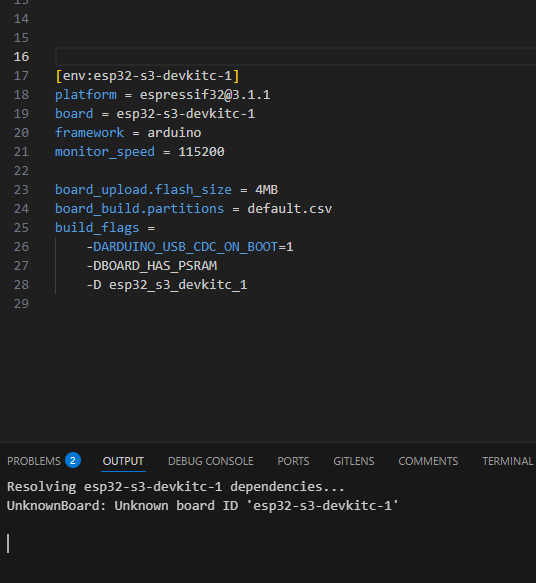
I tried to set this version in platformio too, but then the board couldnt be found:

i know there was a thread with the same problem but from what i understand there wasn’t found a solution
link

Thank u in advance

This is not valid.
To get the latest Arduino Espressif version, you have to use pioarduino’s platform-espressif32.

For example to get the latest 3.2.0:

platform = https://github.com/pioarduino/platform-espressif32/releases/download/54.03.20/platform-espressif32.zip

You’ll find the correct settings for your ESP32-S3 DevKit module here

Hi, does that mean the Arduino Espressif 3.x.x framework can work with Platformio by just specifying the platform as in your reply instead of for example:

platform = espressif32 @ 6.12.0

which is using Arduino framework 2.0.17?

If that really works, why there still isn’t a release:

with supported Arduino framework 3.x.x?

I am aware Espressif abandoned developing releases targeting Platformio but can’t find any news about plans to release the espressif32 version that works with Arduino Espressif framework 3.x.x by Platformio team and most of the ESP32(-S3) code that can be found these days can’t be compiled with the old framework for the reasons similar to the problem described in the initial post of this topic.

Correct! I’ve listed the available versions (pioarduino and platformio) here: GitHub - sivar2311/platform-espressif32-versions: A list of espressif32-platform versions for PlatformIO / pioarduino

You’ll find the answer here: https://github.com/platformio/platform-espressif32/issues/1225

To save you from reading too much: No, there will be no official Espressif Arduino 3.x releases until further notice.

That is why Jason2866 created the pioarduino fork. This is currently the best way to get a very up-to-date Espressif32 platform. Take a look at the release dates for Espressif and pioaduino. It only takes a few hours for the latest Espressif release to become available in pioarduino.

At this point, a big thank you to Jason2866!

I changed platform definition to:

platform = https://github.com/pioarduino/platform-espressif32/releases/download/55.03.35/platform-espressif32.zip

and the code using the new Arduino 3.x.x syntax compiled without errors.

However, the installation of pioarduino framework removed all of my earlier Arduino frameworks from the .platformio\packages directory.

This is what I have in .platformio\platforms:

27.09.2021.  00:42    <DIR>          atmelavr
28.12.2025.  22:08    <DIR>          espressif32
19.04.2025.  13:26    <DIR>          espressif32@3.5.0
15.05.2022.  22:23    <DIR>          espressif32@4.2.0
24.07.2024.  04:24    <DIR>          espressif32@6.7.0
15.08.2021.  21:53    <DIR>          espressif8266
26.04.2022.  17:52    <DIR>          ststm32

When I compiled an old project with:

platform = espressif32 @ 6.7.0

Platformio had to download the Arduino framework 2.0.16 for that version of the espressif32 platform again and then it renamed the pioplatformio directory from framework-arduinoespressif32 to framework-arduinoespressif32@src-32_hex_chars_here and stored espressif32 @ 6.7.0 framework in the framework-arduinoespressif32 directory.

Then I configured the project with:

platform = espressif32

and the Arduino framework directory belonging to espressif32 @ 6.7.0 was removed once again while pioplatformio framework was again stored in framework-arduinoespressif32 directory.

In other words, now every time I want to compile an older project using a specific version of espressif32 @ x.x.x espressif32 platform, Platformio has to download the corresponding Arduino framework again and again.

Before, multiple Arduino framework versions coexisted in .platformio\packages directory all the time and I could switch between them in a few seconds by just editing platformio.ini but now all Arduino framework versions except the one installed via pioarduino are being removed as soon as I configure the project with platform = espressif32 and if I want to use them I have to download them again.

I will start the new thread about that problem containing more details.

Thank you! I have already read all of the messages from that issue before but wasn’t aware of pioplatformio until yesterday.

That is amazing! How is that even possible? Before we had to wait for weeks or months until the new platform was ready for using with Platformio IDE and now we can use the new version just a few hours after release!? :open_mouth:

Certainly :slight_smile:

No, if you install a new / different version, the old ones will be kept!
Check in PIO Home / Platforms. You should see a list of all your installed platforms.

If you don’t speficy a version to be used (aka platform = espressif32 @ 6.7.0, platformio will use the version installed which has the higest number.

Exactly, this hasn’t change. This is how it was all the time - nothing changed.
But usually there is no additional download. You can have installed multiple versions of the same platform at the same time!

I can’t answer this question due to the lack of knowledge on how to create and maintain a platform.

The old ones are being kept as long as I don’t use:

platform = https://github.com/pioarduino/platform-espressif32/releases/download/55.03.35/platform-espressif32.zip

But in the moment I use that platform all old Arduino framework directories from .platformio\packages are removed.

The old platforms are still kept in .platformio\platforms directory and are visible in the list of all installed platforms but the framework-arduinoespressif32 packages for the old platforms are not listed as installed anymore as were before using platform installed from pioplatformio as all their directories named framework-arduinoespressif32@x.xxxxx.xxxxxx have been deleted from .platformio\packages in the exact moment I configure any project to use platform = https://github.com/pioarduino/platform-espressif32/releases/download/55.03.35/platform-espressif32.zip and save platformio.ini.

Yes, that works well. The platform installed via pioarduino is labeled as 55.3.35 in the list of all installed platforms and that platfom is used either when the project is configured with platform = https://github.com/pioarduino/platform-espressif32/releases/download/55.03.35/platform-espressif32.zip or with platform = espressif32.

Let me describe step by step what exactly happens and how the problem can be reproduced:

1. Starting point:

Before configuring platform = https://github.com/pioarduino/platform-espressif32/releases/download/55.03.35/platform-espressif32.zip for the first time I had the following platform versions listed as installed:

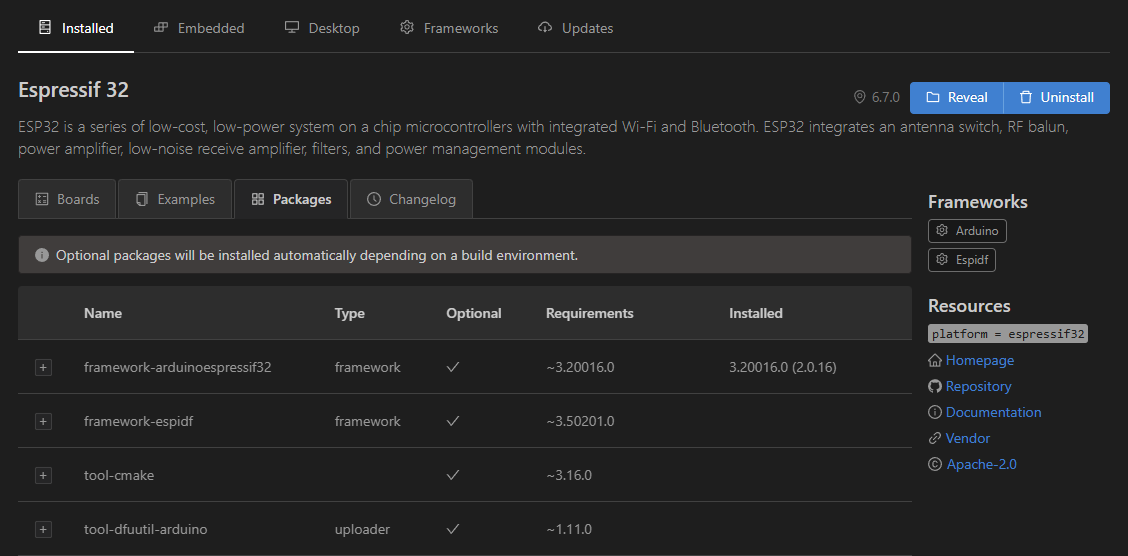
Espressif 32 6.7.0    <-- Arduino framework 3.20016.0 (2.0.16)
Espressif 32 4.2.0    <-- Arduino framework 3.20002.220503 (2.0.2)
Espressif 32 3.5.0    <-- Arduino framework 3.10006.210326 (1.0.6)

I installed 6.7.0 last year, I installed 4.2.0 in 2022. and I installed 3.5.0 this year because I had to compile old ESP32 CAM face recognition example which was later removed.

All these three versions were fully installed and I could configure any project with:

platform = espressif32 @ 6.7.0

or

platform = espressif32 @ 4.2.0

or

platform = espressif32 @ 3.5.0

at any time while nothing was downloaded and the project was ready in just two seconds.

Arduino Espressif frameworks belonging to these platform versions were present inside .platformio\packages directory in the following subdirectories:

framework-arduinoespressif32                   <-- platform = espressif32 @ 6.7.0 (Arduino framework 2.0.16)
framework-arduinoespressif32@3.20002.220503    <-- platform = espressif32 @ 4.2.0 (Arduino framework 2.0.2)
framework-arduinoespressif32@3.10006.210326    <-- platform = espressif32 @ 3.5.0 (Arduino framework 1.0.6)

framework-arduinespressif32 entries were listed as installed for all these platform versions all the time as in the screenshot:

2. After using platform from pioplatformio:

When I configured the project with:

platform = https://github.com/pioarduino/platform-espressif32/releases/download/55.03.35/platform-espressif32.zip

Directory framework-arduinoespressif32 (735 MB) containing Arduino framework 2.0.16 was deleted.
Directory framework-arduinoespressif32@3.20002.220503 (436 MB) containing Arduino framework 2.0.2 was deleted.
Directory framework-arduinoespressif32@3.10006.210326 (117 MB) containing Arduino framework 1.0.6 was deleted.

Then a new framework-arduinoespressif32 directory was created containing Arduino framework 3.3.5 installed via pioplatformio.

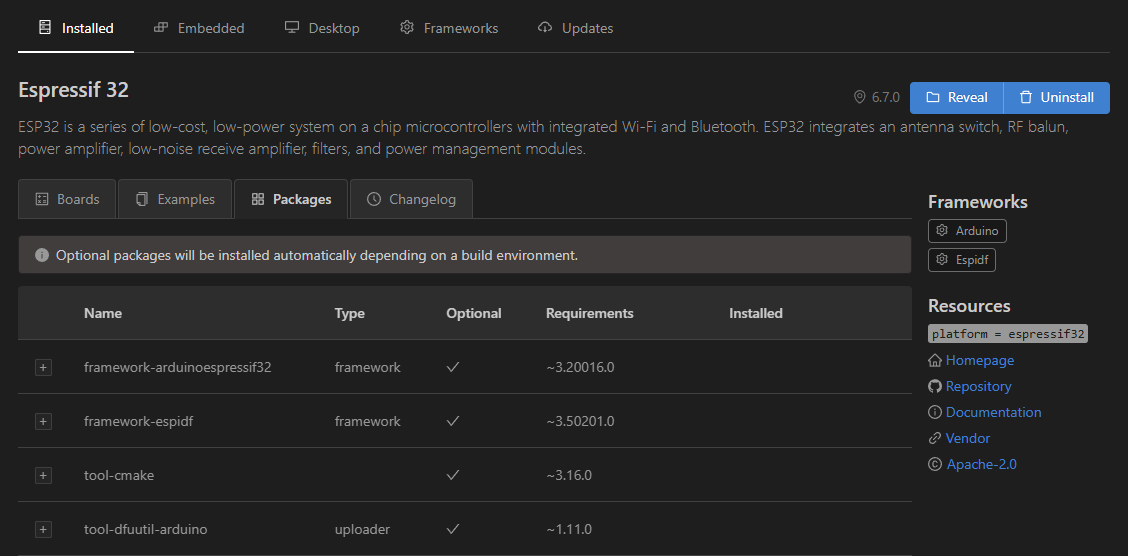
The old 6.7.0, 4.2.0 and 3.5.0 platforms were kept but their Arduino Espressif frameworks were deleted and the Arduino frameworks were missing under Installed column as in the screenshot:

When I now wanted to compile old projects configured with:

platform = espressif32 @ 6.7.0

or

platform = espressif32 @ 4.2.0

or

platform = espressif32 @ 3.5.0

the project wasn’t ready after two seconds as before since old Arduino framewok was now missing so Platformio had to redownload hundreds of MBs and unpack the archive.

3. Trying one more time:

After compiling the project with platform = espressif32 @ 6.7.0 I noticed the directory containing Arduino framework installed via pioplatformio was renamed from framework-arduinoespressif32 to something like:

framework-arduinoespressif32@src-52f841c98ab7260d8a74b2ec8f40af42    <-- I changed the hex nums

and framework-arduinoespressif32 directory now contained Arduino framework 2.0.16 belonging to espressif32 @ 6.7.0.

Then I compiled an old project with platform = espressif32 @ 4.2.0 and another old project with platform = espressif32 @ 3.5.0 after which there were these Arduino frameworks in .platformio\packages:

framework-arduinoespressif32                   <-- platform = espressif32 @ 6.7.0 (Arduino framework 2.0.16)
framework-arduinoespressif32@3.20002.220503    <-- platform = espressif32 @ 4.2.0 (Arduino framework 2.0.2)
framework-arduinoespressif32@3.10006.210326    <-- platform = espressif32 @ 3.5.0 (Arduino framework 1.0.6)
framework-arduinoespressif32@src-52f841c98ab7260d8a74b2ec8f40af42    <-- containing Arduino framework 3.3.5 installed via pioplatformio

In other words, the situation was now exactly as in 1. Starting point with the addition of the framework installed via pioplatformio and I could again configure the old 6.7.0, 4.2.0 and 3.5.0 platforms without Platformio downloading anything and in just two seconds - exactly as before!!

However, as soon as I configured the project with:

platform = https://github.com/pioarduino/platform-espressif32/releases/download/55.03.35/platform-espressif32.zip

all old Arduino framework directories were deleted again and the situation was again as in 2. After using platform from pioplatformio.

So the problem description in one sentence is:

Using platform from pioplatformio destroys all currently installed Arduino Espressif frameworks by deleting all framework-arduinoespressif32* directories from .platformio\packages except the one downloaded via pioplatformio.
Thank you very much for the detailed description. I had never noticed the disappearance of the framework directory before.

You have clearly pointed out that this is a behavior of the pioarduino platform. Please open an issue in the pioarduino repository.