ESP32-S3-DeevKitC-1 (Wroom2) doesnt start

Hi,

I tried my first project, a simple blinky, the source runs in Arduino IDE, so it is ok, I imported it into Visual Studio Code and PlatformIO, it compiles ans links without error, it finds the Com-port, it loads (percentage running up to 100%) but never start blinking.

Whats the problem?

Thanks a lot for help a newbee (to Platformio)

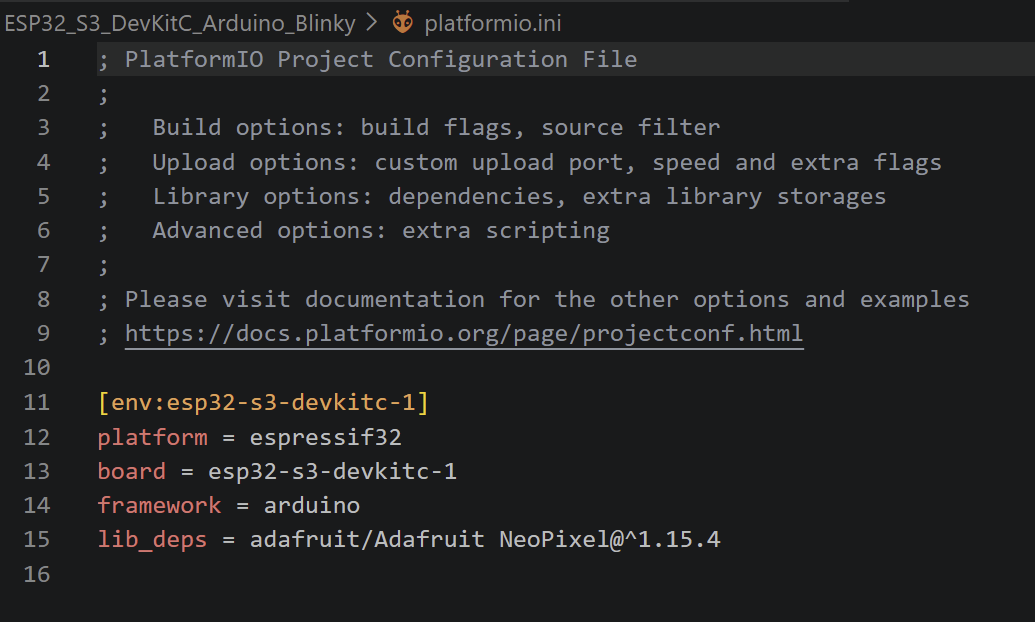
What’s your platformio.ini?

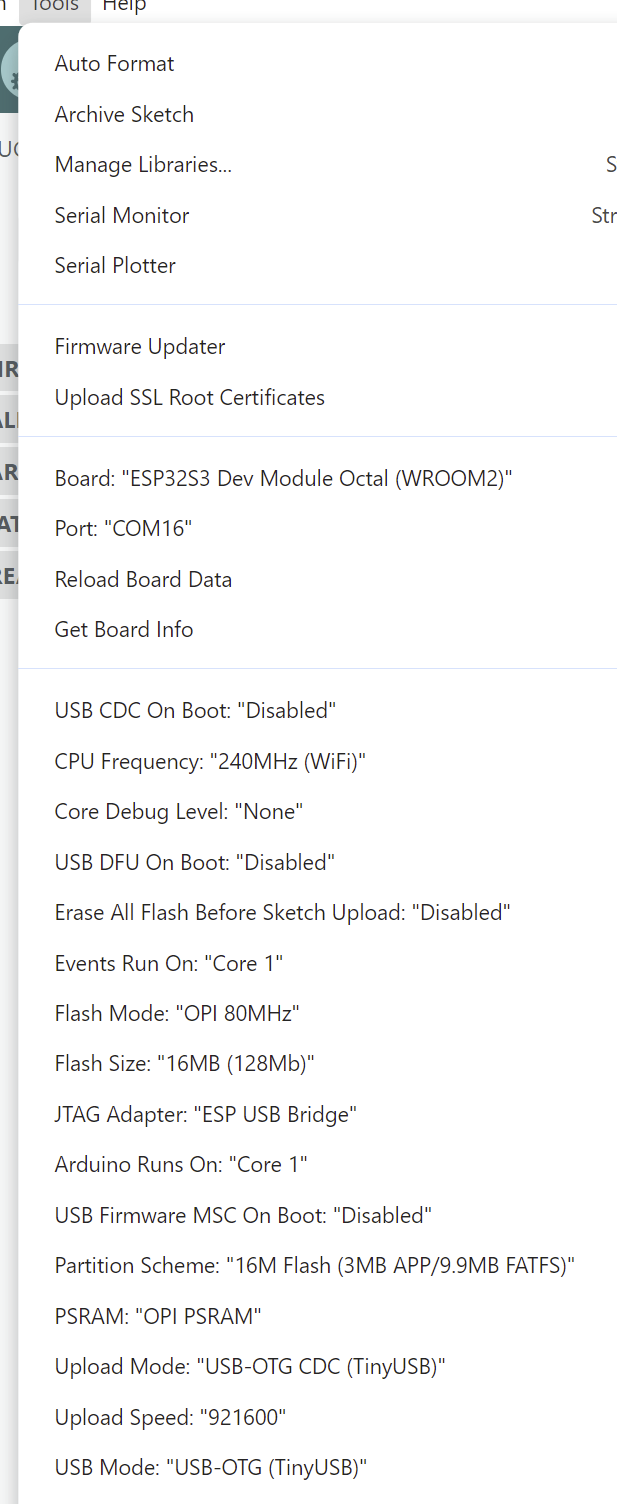
Screenshot of the Arduino IDE → Tools menu with which it works in the Arduino IDE?

Sorry, as a new user, I am not allowed to put more than one image in a message …

The first thing that you’ll want to do is reduce it to the most basic serial and blinky sketch. Running neopixels is overkill.

#define LED LED_BUILTIN /* (or a different fixed pin number) */

void setup() {
   pinMode(LED, OUTPUT);
   Serial.begin(115200);
}

void loop() {
  Serial.println("Hello");
  digitalWrite(LED, HIGH);
  delay(1000);
  digitalWrite(LED, LOW);
  delay(1000);
}

Next you’ll want to sync your platformio.ini settings to the Arduino IDE settings as closely as possible. Right now you have these settings which is essentially 8MB of QIO Flash and no PSRAM, while in the Arduino IDE you have a 16 MByte OPI FLash with OPI PSRAM.

Then, there’s the problem that the official Espressif32 platform version is so outdated, it runs on Arduino-ESP32 core 2.0.16. You are probably running on a 3.x core, like v3.3.8.

Hence you should try and use PIOArduino with possibly this board by setting the following platformio.ini:

[env:esp32-s3]
platform = https://github.com/pioarduino/platform-espressif32/releases/download/stable/platform-espressif32.zip
; close board: 32MB Octal Flash (80MHz), 8MB Octal PSRAM, USB CDC disabled
board = esp32-s3-devkitc-1-n32r8v
framework = arduino
monitor_speed = 115200

; Partition Scheme: "16M Flash (3MB APP/9.9MB FATFS)
board_build.partitions = app3M_fat9M_16MB.csv
board_upload.flash_size = 16MB

Note the PIOArduino requirements, you might need to install Git.

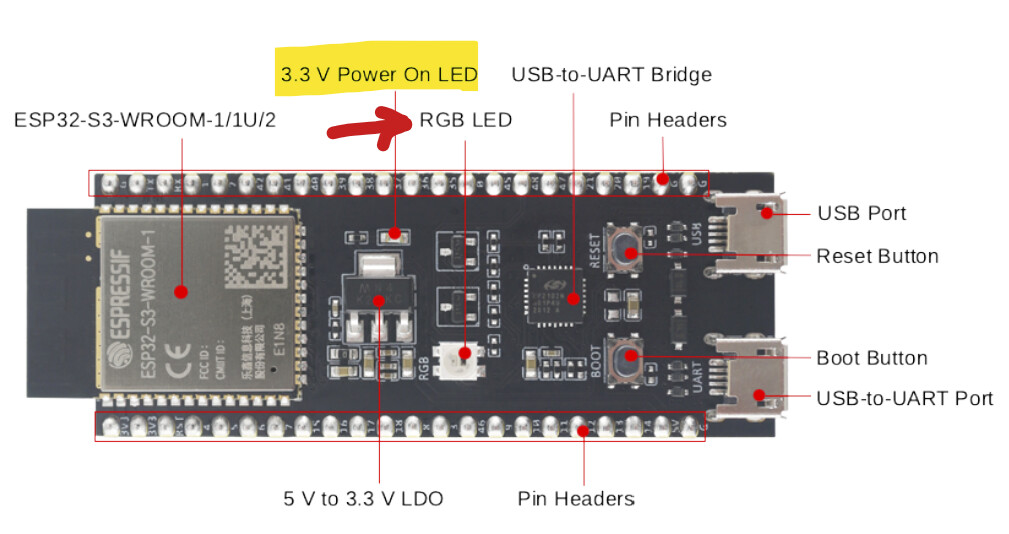
As far as I know, there is no simplee led on this board, so the blinky has to use the RGB led. Not my favorite, but this board is not my design.

I thought, that selecting a board will implizitly setting all ‘flags’, ok, I have to do by hand.

I have to leave soon, try it later at night, maybe tomorrow, so thre will be a small delay.

Thanks a lot.

digital_write handles the RGB_LED internally. If the used pin number is RGB_BUILTIN a call to neopixelWrite is executed.

Here is a full working project for the esp32-s3-n16r8 with stock platformio’s espressif32 platform (6.12.0)

main.cpp

#include <Arduino.h>

void setup() {
    Serial.begin(115200);
    Serial.println("Hello World!");
}

void loop() {
    digitalWrite(RGB_BUILTIN, HIGH);
    delay(1000);
    digitalWrite(RGB_BUILTIN, LOW);
    delay(1000);
}

platformio.ini

; Flash: 16MB QD, PSRAM: 8MB OT
[env:esp32-s3-devkitc-1]
platform = espressif32 @ 6.12.0
board = esp32-s3-devkitc-1
framework = arduino
monitor_speed = 115200

board_build.arduino.memory_type = qio_opi
board_build.flash_mode = qio
board_build.psram_type = opi
board_upload.flash_size = 16MB
board_upload.maximum_size = 16777216
board_build.partitions = default_16MB.csv
board_build.extra_flags = 
  -DBOARD_HAS_PSRAM

Ok, thanks

This trick is never noted down in the documents of the board. I used the simple blinkies and nothing happens (in the Arduino IDE) so I started with NeoPixels.

Soooo. I adapted the PlatformIO.ini and the main.ccp, compilation and linking fine, uploading fine runs to ‘100%’ and …. nothing else, no blinky board.

I pressed the ‘Rst’ button, no blinking board.

Cross check with Arduino IDE (just in the case the board, cable or USB interface of the lappi was dying in the meanwhile) works fine, I got a blinky board.

Where to look next?

Ooooh,

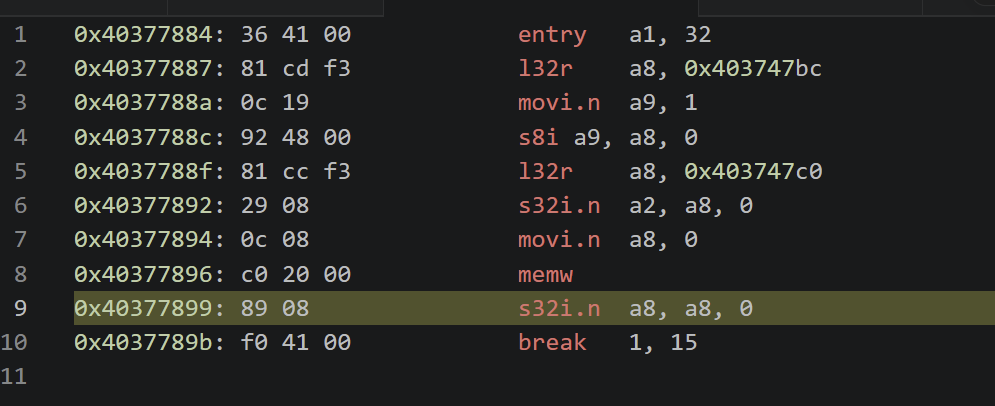
I don’t have a blinky board, but the debugger is running someehow:

And I get a crash dump.

Sorry again, as a new user I am not allowed to post more than one image in a reply …

What’s the call stack in the left side of the debugger when it hits that panic function?
You can copy and paste the text. The format will be kept when you use pre-formatted text.

Thanks Boris, will do it the nxt time

That’s a very very early abort with flash initialization. Something is wrong with the flash mode, votlage or size settings.

Per https://docs.espressif.com/projects/esp-dev-kits/en/latest/esp32s3/esp32-s3-devkitc-1/user_guide_v1.1.html#contents-and-packaging the WROOM2 is also the only model that has a 1.8V flash voltage instead of 3.3V.

Per https://docs.espressif.com/projects/esptool/en/latest/esp32s3/espefuse/set-flash-voltage-cmd.html the selected flash voltage depends on the MTDI pin (IO45). That signal is available at the J3 header per schematics.

Is there anything connected to IO45? Does the behavior change when you connect IO45 to GND to force it to 1.8V? Is the board still working when flashing it with the Arduino IDE?

Can you double check it says WROOM2 on your board’s module? Then it should be a “ESP32-S3-DevKitC-1-N32R16V” for which there is no current board definition.

I’d like to verify what config is actually running in your Arduino IDE configuration. So I need you to set the Arduino IDE → Tools → Core Debug Level to the maximum (trace / debug) and upload this sketch

/* will expand to bool shouldPrintChipDebugReport(void) { return true; } */
ENABLE_CHIP_DEBUG_REPORT

void setup() {
  Serial.begin(115200);
}

void loop() { delay(1000); }

What does the serial monitor print at 115200 baud?

Hello Max,

according to my order at Mouser you were right:

ESP32-S3-DevKitC-1-N32R16V

On th metal shielding I can read ‘Wroom2’.

I don’t connect any GPIO pin, cause my intention is to build an USB boot keyboard. It should control a MixPre box by Sound Systems and it turns out, that this box is a diva. It works with hp and Logitech kbds, but fails with my module. I found out, that the keyboards exposing a Composite HID device with TWO logical keyboard devices. At this point i failed with Arduino IDE and framework and try now the VSC and PIO way of life.

The module works fine with Arduino IDE, blinky running, ESP-NOW (as receiver) running everything within minutes. Debugging doesnt’t work, the S3 should have a embedded debug intrface, but I can’t get it to work. On th other habd, it looks like tzhe native USB socket is used for debugging, and this sockt I ned exclusivly for my project, so debugging with led, port signals & scope or println is the only way to go.

I also have an Atmel-ICE or I can buy other JTAG box, no problem, if there is some guaranteee, that VSC with PlatformIO can use it somehow. I am a newbee to PatformIO, so nothing is easy.

I used AtmlStudio and VisualStudio for 15 years, so mbedded programming is not new for my, but the tools are.

The board still runs with Arduino IDE, no damage for now:

Sketch uses 404942 bytes (12%) of program storage space. Maximum is 3145728 bytes.
Global variables use 52052 bytes (15%) of dynamic memory, leaving 275628 bytes for local variables. Maximum is 327680 bytes.
esptool v5.2.0
Serial port COM16:
Connecting....
Connected to ESP32-S3 on COM16:
Chip type:          ESP32-S3 (QFN56) (revision v0.2)
Features:           Wi-Fi, BT 5 (LE), Dual Core + LP Core, 240MHz, Embedded PSRAM 16MB (AP_1v8)
Crystal frequency:  40MHz
MAC:                90:e5:b1:d5:42:34

Uploading stub flasher...
Running stub flasher...
Stub flasher running.
Changing baud rate to 921600...
Changed.

Configuring flash size...
Flash will be erased from 0x00000000 to 0x00004fff...
Compressed 18736 bytes to 12224...

Writing at 0x00000000 [                              ]   0.0% 0/12224 bytes... 

Writing at 0x00004930 [==============================] 100.0% 12224/12224 bytes... 
Wrote 18736 bytes (12224 compressed) at 0x00000000 in 0.3 seconds (441.3 kbit/s).
Verifying written data...
Hash of data verified.
Flash will be erased from 0x00008000 to 0x00008fff...
Compressed 3072 bytes to 144...

Writing at 0x00008000 [                              ]   0.0% 0/144 bytes... 

Writing at 0x00008c00 [==============================] 100.0% 144/144 bytes... 
Wrote 3072 bytes (144 compressed) at 0x00008000 in 0.0 seconds (588.8 kbit/s).
Verifying written data...
Hash of data verified.
Flash will be erased from 0x0000e000 to 0x0000ffff...
Compressed 8192 bytes to 47...

Writing at 0x0000e000 [                              ]   0.0% 0/47 bytes... 

Writing at 0x00010000 [==============================] 100.0% 47/47 bytes... 
Wrote 8192 bytes (47 compressed) at 0x0000e000 in 0.1 seconds (911.5 kbit/s).
Verifying written data...
Hash of data verified.
Flash will be erased from 0x00010000 to 0x00072fff...
Compressed 405088 bytes to 231496...

Thats the output befor upload of my sketch starts, only to document the different partionis.

And here is the debugger output of your code:

ESP-ROM:esp32s3-20210327
Build:Mar 27 2021
rst:0x1 (POWERON),boot:0x8 (SPI_FAST_FLASH_BOOT)
SPIWP:0xee
Octal Flash Mode Enabled
For OPI Flash, Use Default Flash Boot Mode
mode:SLOW_RD, clock div:1
load:0x3fce2820,len:0xfb0
load:0x403c8700,len:0xaf4
load:0x403cb700,len:0x2e34
entry 0x403c8898
=========== Before Setup Start ===========
Chip Info:
------------------------------------------
  Model             : ESP32-S3
  Package           : 0
  Revision          : 0.02
  Cores             : 2
  CPU Frequency     : 240 MHz
  XTAL Frequency    : 40 MHz
  Features Bitfield : 0x00000012
  Embedded Flash    : No
  Embedded PSRAM    : No
  2.4GHz WiFi       : Yes
  Classic BT        : No
  BT Low Energy     : Yes
  IEEE 802.15.4     : No
------------------------------------------
INTERNAL Memory Info:
------------------------------------------
  Total Size        :   344264 B ( 336.2 KB)
  Free Bytes        :   311720 B ( 304.4 KB)
  Allocated Bytes   :    28132 B (  27.5 KB)
  Minimum Free Bytes:   306572 B ( 299.4 KB)
  Largest Free Block:   278516 B ( 272.0 KB)
------------------------------------------
SPIRAM Memory Info:
------------------------------------------
  Total Size        : 16777216 B (16384.0 KB)
  Free Bytes        : 16774572 B (16381.4 KB)
  Allocated Bytes   :      136 B (   0.1 KB)
  Minimum Free Bytes: 16774572 B (16381.4 KB)
  Largest Free Block: 16515060 B (16128.0 KB)
  Bus Mode          : OPI
------------------------------------------
Flash Info:
------------------------------------------
  Chip Size         : 33554432B (32 MB)
  Block Size        :    65536B (  64.0 KB)
  Sector Size       :     4096B (   4.0 KB)
  Page Size         :      256B (   0.2 KB)
  Bus Speed         : 80 MHz
  Flash Frequency   : 80 MHz (source: 160 MHz, divider: 2)
  Bus Mode          : OPI
------------------------------------------
Partitions Info:
------------------------------------------
                nvs : addr: 0x00009000, size:    20.0 KB, type: DATA, subtype: NVS
            otadata : addr: 0x0000E000, size:     8.0 KB, type: DATA, subtype: OTA
               app0 : addr: 0x00010000, size:  3072.0 KB, type:  APP, subtype: OTA_0
               app1 : addr: 0x00310000, size:  3072.0 KB, type:  APP, subtype: OTA_1
               ffat : addr: 0x00610000, size: 10112.0 KB, type: DATA, subtype: FAT
           coredump : addr: 0x00FF0000, size:    64.0 KB, type: DATA, subtype: COREDUMP
------------------------------------------
Software Info:
------------------------------------------
  Compile Date/Time : Apr 25 2026 13:56:41
  Compile Host OS   : windows
  ESP-IDF Version   : v5.5.4
  Arduino Version   : 3.3.8
------------------------------------------
Board Info:
------------------------------------------
  Arduino Board     : ESP32S3_DEV
  Arduino Variant   : esp32s3
  Arduino FQBN      : esp32:esp32:esp32s3-octal:UploadSpeed=921600,USBMode=default,CDCOnBoot=default,MSCOnBoot=default,DFUOnBoot=default,UploadMode=cdc,CPUFreq=240,FlashMode=opi,FlashSize=16M,PartitionScheme=app3M_fat9M_16MB,DebugLevel=debug,PSRAM=opi,LoopCore=1,EventsCore=1,EraseFlash=none,JTAGAdapter=bridge
============ Before Setup End ============
[   363][D][esp32-hal-uart.c:845] uartSetPins(): Attaching pin 44 to UART0 as RX
[   370][D][esp32-hal-uart.c:849] uartSetPins(): Attaching pin 43 to UART0 as TX
=========== After Setup Start ============
INTERNAL Memory Info:
------------------------------------------
  Total Size        :   344264 B ( 336.2 KB)
  Free Bytes        :   310916 B ( 303.6 KB)
  Allocated Bytes   :    28776 B (  28.1 KB)
  Minimum Free Bytes:   305768 B ( 298.6 KB)
  Largest Free Block:   278516 B ( 272.0 KB)
------------------------------------------
SPIRAM Memory Info:
------------------------------------------
  Total Size        : 16777216 B (16384.0 KB)
  Free Bytes        : 16772968 B (16379.9 KB)
  Allocated Bytes   :     1612 B (   1.6 KB)
  Minimum Free Bytes: 16772968 B (16379.9 KB)
  Largest Free Block: 16515060 B (16128.0 KB)
------------------------------------------
GPIO Info:
------------------------------------------
  GPIO : BUS_TYPE[bus/unit][chan]
  --------------------------------------  
    43 : UART_TX[0]
    44 : UART_RX[0]
============ After Setup End =============

Sorry, I was blocked again, a new user can’t give more than two replays a day ….. sorry for that delay.

Is there any output when you set the platformio.ini to

[env:esp32-s3]
platform = https://github.com/pioarduino/platform-espressif32/releases/download/stable/platform-espressif32.zip
; board: 32MB Octal Flash (80MHz), 8MB Octal PSRAM, USB CDC disabled
board = esp32-s3-devkitc-1-n32r8v
framework = arduino
monitor_speed = 115200

With the same src/main.cpp

#include <Arduino.h>
/* will expand to bool shouldPrintChipDebugReport(void) { return true; } */
ENABLE_CHIP_DEBUG_REPORT

void setup() {
  Serial.begin(115200);
}

void loop() { delay(1000); }

Use the project task “Upload and Monitor”. Press the reset button if needed if there is no output. Use the “UART” USB port, not the “native USB” USB port.

Sorry, the symbol ENABLE_CHIP_DEBUG_REPORT is unknown

Serial is also unknown, which .h to include, there where some to sleect guss CDC?