ESP32 + PlatformIO: Upload succeeds but Serial Monitor cannot open port (COM4) + Firebase stopped working

Hi everyone,

I’m working on my final graduation project (TCC) and I’m having some serious issues. This is my first time using ESP32 and PlatformIO.

What I’m building:

The project is called Cuida+ (a medication monitoring system for elderly people).

It uses:

• ESP32

• Sensor Shield

• I2C LCD Display

• Reed Switch

• Infrared sensor

• Buzzer

• Firebase Realtime Database (to read and write data)

What used to work:

When I was using only the ESP32 (without the Shield and other components), it:

• Connected to Wi-Fi normally

• Successfully wrote data to Firebase

What is happening now:

After assembling the full setup (ESP32 + Shield + all components):

• Build succeeds

• Upload succeeds

• But when I try to open the Serial Monitor, I get a port error

• The port COM4 appears as detected, but the Serial Monitor cannot open it

• The ESP32 is no longer connecting to Wi-Fi or reading/writing to Firebase like before

Important notes:

• I no longer have Arduino IDE installed (I uninstalled it to use only PlatformIO)

• No Serial Monitor was open during the upload

• I’m powering the Shield with a separate power cable and the ESP32 with a USB cable at the same time (as recommended by my teacher)

• I already tried reconnecting the cable, restarting VS Code, and doing multiple builds

What I need help with:

1. Opening the Serial Monitor normally

2. Getting the ESP32 to connect to Wi-Fi again

3. Being able to read and write data to Firebase with all components connected

My deadline is next Tuesday.

Has anyone faced this issue where the upload works, the port is detected, but the Serial Monitor refuses to open? Or where Wi-Fi/Firebase stops working after connecting the Shield?

Any help would be really appreciated. Thank you!
Have you tried uploading an absolutely minimal blink and print sketch already? That way you can check if the ESP32 is still working correctly at all.

#include <Arduino.h>

void setup() { Serial.begin(115200); }
void loop() { Serial.println("Test"); delay(3000); }

Hi, thanks for the suggestion. I already tested a minimal sketch today.

I uploaded a simple code that blinks the built-in LED and it worked correctly. I also tested sending text to the LCD display and it showed the message “Projeto interativo” successfully.

So the ESP32 itself is working. The problem only appears when I try to use the full project (with Wi-Fi, the Firebase and all sensors connected).

To begin with, I have a few questions:

  1. Are the following two items the only things you have tested using a minimal, small-scale program?
  • Blinking an LED
  • Displaying a string on an LCD via I2C
  1. Did the minimal program suggested by “maxgerhardt”—which outputs only to the serial monitor—work?
    The sample code he provided focuses specifically on the issue you mentioned at the start: the inability to connect to the serial monitor. If you haven’t tried it yet, please do so.
  2. Since you mentioned “COM,” I assume you are using Windows. How is the COM port identified in Device Manager?
  3. Does the port number recognized by your PC change when you press the reset button on the ESP32 device?
    —> Do you observe the same behavior in both your full-featured program (which includes everything you wanted to implement) and the minimal test program?

To help the members of this community find a solution to your problem, there is some basic information we need from you. Could you please provide the following?
(1) The exact model of the board you are using.
(2) The full content of your platformio.ini file.

I understand that you may be pressed for time, but a reliable way to identify the root cause of a problem is to build your project up gradually, adding one feature at a time and verifying each step. Even a slight change in behavior can provide a clue toward a solution. While this may not be the most “elegant” approach, it is certainly an effective way to pinpoint where the issue lies.

You must avoid the “big bang” approach (trying to implement everything at once).

Hello! Thanks for the guidance.

To answer your questions, I actually tested every single component individually using small test programs first to see how they reacted and to make sure everything was working properly. All of those individual tests worked as expected. As for the minimal program suggested by maxgerhardt it worked fine.

In Windows Device Manager, the port appears under Ports as a USB bridge device (something like silicon labs CP210x USB to UART Bridge or CH340). The port number doesn’t change when I press the reset button or change/upload different code — it always stays the same, like COM4, for example.

Regarding the behavior, I feel the underlying issue is essentially the same between the full program and the minimal one. The main difference is that the full program behaves differently simply because the code is much larger.

As for the board, I am using an ESP32 DevKit V1 (DOIT DevKit v1). Regarding my ⁠platformio.ini⁠ file, I work on this project using my work computer, so I don’t have access to it right now. As soon as I get back to my work setup, I will provide the full content here.

Thank you for the advice about avoiding the “big bang” approach! Since this is my very first time working with the ESP32, I ended up trying to implement everything at once and realized how challenging that can be. I will definitely focus on building and testing feature by feature from now on.

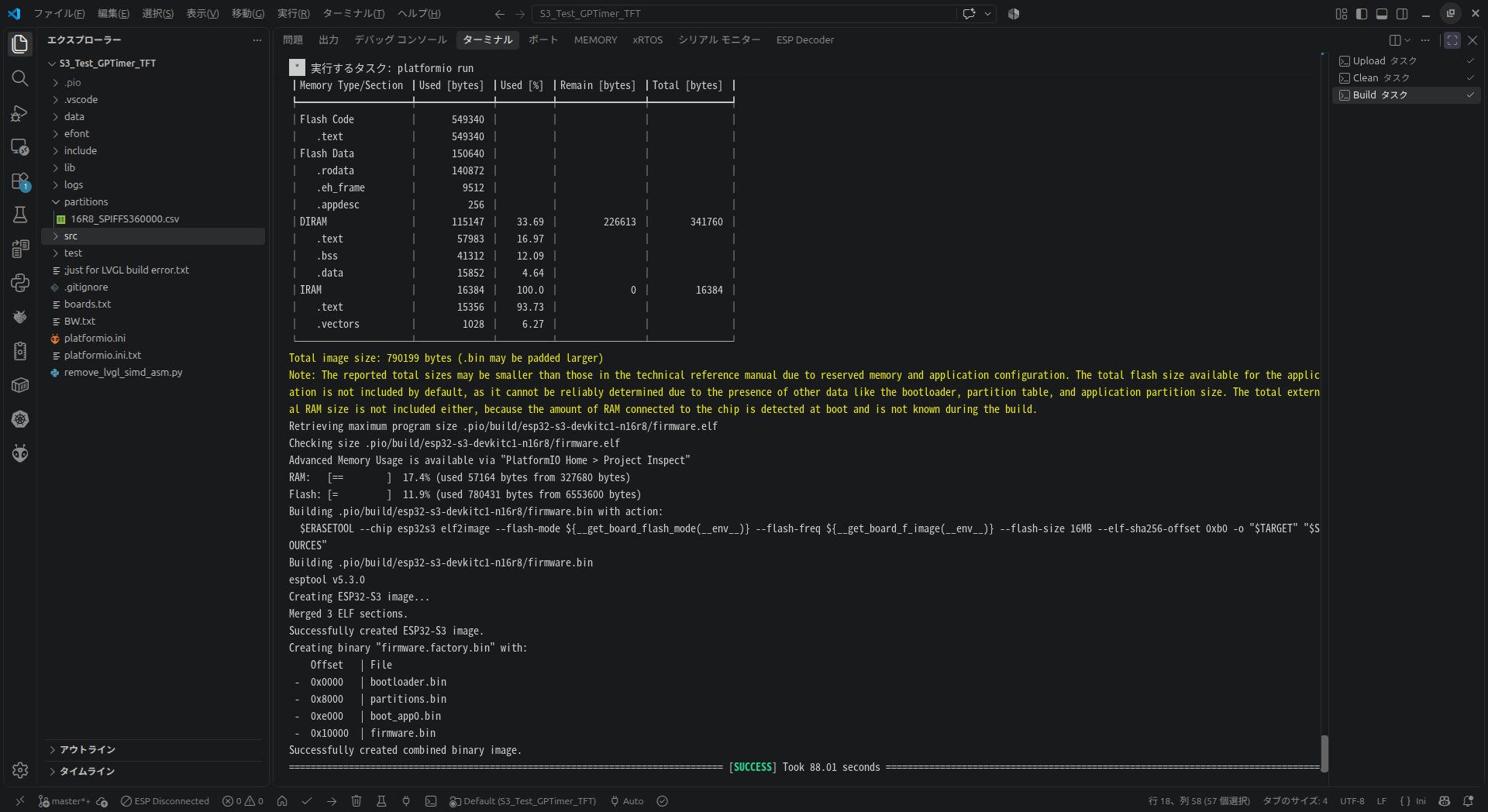
If the unit tests pass, let’s take a look at the build results.

  • Is the size of the compiled firmware appropriate for the device and partition definition you are using?
    You should be able to see the final size of the build in the terminal output.
    Since the flash size appears to be 4MB, the default partition configuration limits the firmware size to 1,310,720 bytes.

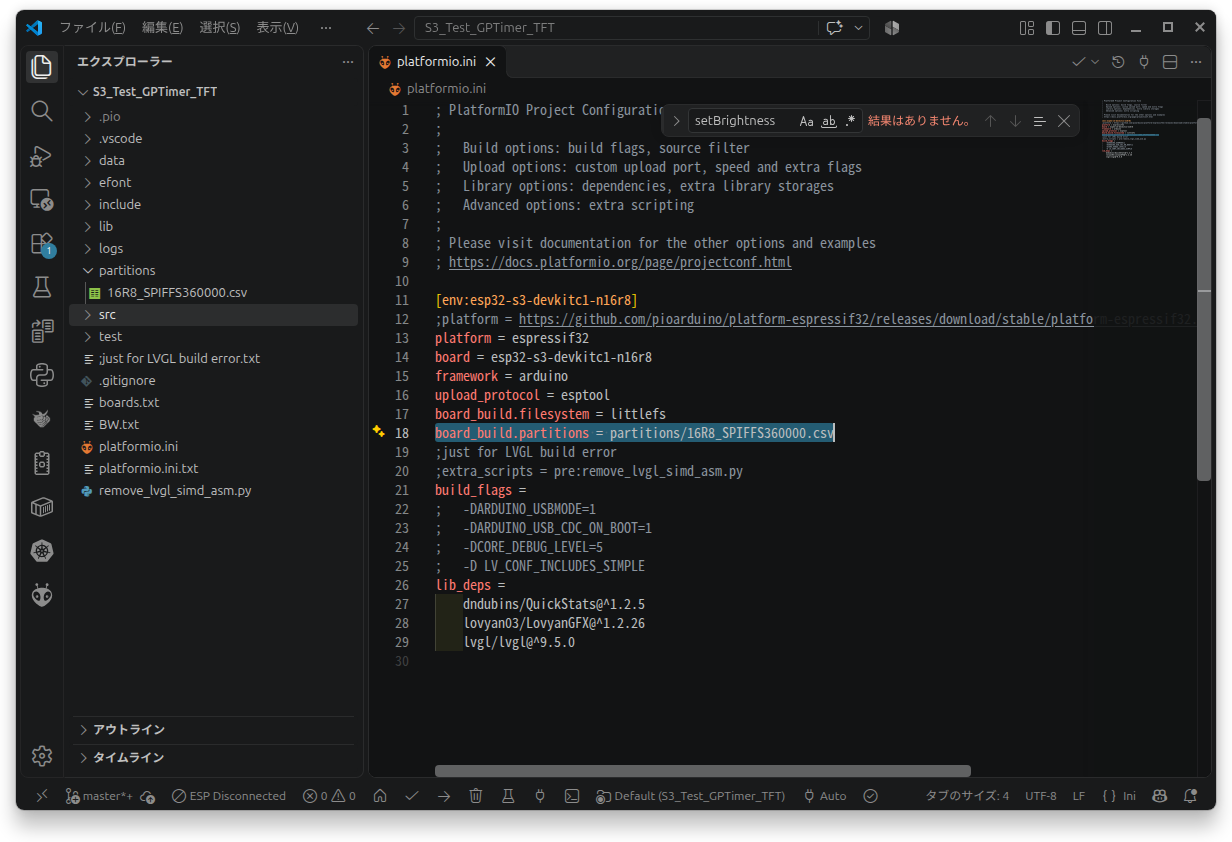
The contents of your platformio.ini file are crucial for determining this.
⇒ Please provide the full content of this file if possible.

If the partition size does not match the size of your compiled firmware, it will not function correctly.
If you need to adjust the partition size, you can, for example, download max_app_4MB.csv from arduino-esp32/tools/partitions at master · espressif/arduino-esp32 · GitHub and explicitly specify it in your platformio.ini.

I have attached two screenshots from a recent project of mine; please note that since I am using Ubuntu, you will need to adjust the file paths to the Windows format.
For more information on handling partitions, please refer to the following documentation: