how do i access this?
What is “this” and what do you mean by “how to access” ? Is your question related to PlatformIO?
You can upload to a STM32F1 that has the Maple DFU uploader present by using
upload_protocol = dfu
full example for a STM32F103CB
[env:genericSTM32F103CB]
platform = ststm32
board = genericSTM32F103CB
framework = arduino
; after upload (and for reupload), show up as a USB serial port when the firmware is running
build_flags =
  -D PIO_FRAMEWORK_ARDUINO_ENABLE_CDC
; upload via DFU (plus leave first few kB free for Maple DFU bootloader
upload_protocol = dfu
Or if you want to use the Maple Arduino core instead STM32Duino
sorry for the inconvenience!
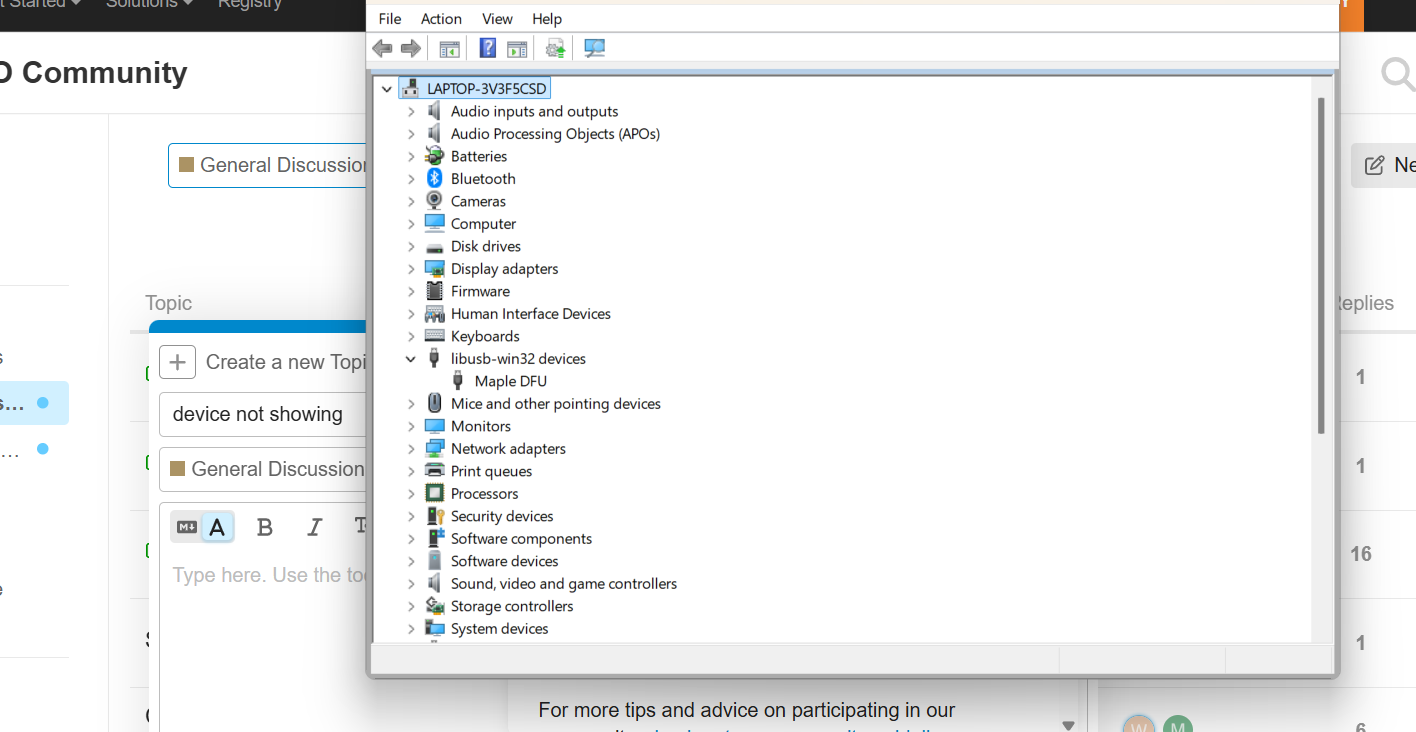
in the above picture lib usb32 devices i want to access maple dfu which is bluepill stm32f103c8t6
but it does not have a com port ,
what to do ?
[env:blackpill_f411ce]
platform = ststm32
board = genericSTM32F103C6
framework = arduino
upload_protocol = dfu
Advanced Memory Usage is available via “PlatformIO Home > Project Inspect”
RAM: [==== ] 42.7% (used 4376 bytes from 10240 bytes)
Flash: [======= ] 72.7% (used 23812 bytes from 32768 bytes)
Building .pio\build\blackpill_f411ce\firmware.bin
Configuring upload protocol…
AVAILABLE: blackmagic, cmsis-dap, dfu, jlink, serial, stlink
CURRENT: upload_protocol = dfu
Looking for upload port…
Error: Please specify upload_port for environment or use global --upload-port option.
For some development platforms it can be a USB flash drive (i.e. /media//)
*** [upload] Explicit exit, status 1
For the very first upload (if there is only the bootloader running, and not yet a serial port that can be nudged with a 1200bps open to return to DFU mode), you have to disable that it expects a serial port. Do that with e.g.
[env:genericSTM32F103C8]
platform = ststm32
board = genericSTM32F103C8
framework = arduino
upload_protocol = dfu
build_flags =
  -D PIO_FRAMEWORK_ARDUINO_ENABLE_CDC
board_upload.use_1200bps_touch = no
board_upload.wait_for_upload_port = no
the last two lines should then be removed again after the first upload has gone through.
Auto-detected: COM6
Uploading .pio\build\blackpill_f411ce\firmware.bin
‘java’ is not recognized as an internal or external command,
operable program or batch file.
At least it’s triggering the uploader now.
The maple uploader is expecting you to have an (older) Java version installed. See Uploading Issue with STM32F103C8T6 Varient(Bluepill) via USB - #4 by maxgerhardt
Though I’m also able to invoke it with later Java versions, but haven’t tested that.
>java --version
java 23.0.1 2024-10-15
Java(TM) SE Runtime Environment (build 23.0.1+11-39)
Java HotSpot(TM) 64-Bit Server VM (build 23.0.1+11-39, mixed mode, sharing)
Verbose mode can be enabled via `-v, --verbose` option
CONFIGURATION: https://docs.platformio.org/page/boards/ststm32/genericSTM32F103C6.html
PLATFORM: ST STM32 (19.4.0) > STM32F103C6 (10k RAM. 32k Flash)
HARDWARE: STM32F103C6T6 72MHz, 10KB RAM, 32KB Flash
DEBUG: Current (blackmagic) External (blackmagic, cmsis-dap, jlink, stlink)
PACKAGES:

* framework-arduinoststm32 @ 4.21100.0 (2.11.0)
* framework-cmsis @ 2.50900.0 (5.9.0)
* tool-dfuutil @ 1.11.0
* tool-dfuutil-arduino @ 1.11.0
* tool-openocd @ 3.1200.0 (12.0)
* tool-stm32duino @ 1.0.2
* tool-stm32flash @ 0.7.0
* toolchain-gccarmnoneeabi @ 1.120301.0 (12.3.1)
  LDF: Library Dependency Finder → https://bit.ly/configure-pio-ldf
  LDF Modes: Finder \~ chain, Compatibility \~ soft
  Found 14 compatible libraries
  Scanning dependencies…
  No dependencies
  Building in release mode
  Checking size .pio\\build\\blackpill_f411ce\\firmware.elf
  Advanced Memory Usage is available via “PlatformIO Home > Project Inspect”
  RAM:   \[=         \]  10.9% (used 1116 bytes from 10240 bytes)
  Flash: \[===       \]  31.9% (used 10456 bytes from 32768 bytes)
  Configuring upload protocol…
  AVAILABLE: blackmagic, cmsis-dap, dfu, jlink, serial, stlink
  CURRENT: upload_protocol = dfu
  Looking for upload port…
  Auto-detected: COM6
  Uploading .pio\\build\\blackpill_f411ce\\firmware.bin
  maple_loader v0.1
  Resetting to bootloader via DTR pulse

#

# A fatal error has been detected by the Java Runtime Environment:

#

# EXCEPTION_ACCESS_VIOLATION (0xc0000005) at pc=0x000000007110b5db, pid=25344, tid=20580

#

# JRE version: Java™ SE Runtime Environment (17.0.12+8) (build 17.0.12+8-LTS-286)

# Java VM: Java HotSpot™ 64-Bit Server VM (17.0.12+8-LTS-286, mixed mode, sharing, tiered, compressed oops, compressed class ptrs, g1 gc, windows-amd64)

# Problematic frame:

# C  \[jSSC-2.8_x86_64.dll+0xb5db\]

#

# No core dump will be written. Minidumps are not enabled by default on client versions of Windows

#

# An error report file with more information is saved as:

# C:\\Users\\surya.platformio\\packages\\tool-stm32duino\\hs_err_pid25344.log

#

# If you would like to submit a bug report, please visit:

#

https://bugreport.java.com/bugreport/crash.jsp

# The crash happened outside the Java Virtual Machine in native code.

# See problematic frame for where to report the bug.

#
Well, tough luck. Maybe uninstall java and try it with the very latest Java version. Or the 32-bit version.
i have a doubt or thesis
when i try to connect to device
the device reset right?
if yes ,it disconnects then reconnects
if that happens that java file gives error
so it is an error in the port or the code
I think the Java Maple loader program just doesn’t work on modern Java anymore or only on 32-bit Java.