Cannot Upload to Raspberry Pi Pico

I have read a few posts here about this issue but nothing in those threads helped. I did not want to hijack someone’s thread, so I reluctantly created my own.
I can upload sketches just fine from Arduino IDE, although I had to have my Pico in bootloader mode the first time. After that, it worked on successive tries to upload. I did not have to use Zadig at all, even though my Pico showed up as RP2 in bootloader mode with a triangle warning as Other Device. I nuked my Pico first, tried it in bootloader mode and not, making sure the com address was correct.
But even AFTER using Zadig, and even rebooting, PlatformIO in VSCode, it searched for a Pico and does not find it.
And the interesting thing, I can place my Pico in bootloader mode, take the firmware.uf2 from the .pio/build folder and drop it on the instance in explorer, and it works great, running my code just as expected. But even after doing that, uploads still fail.

Advanced Memory Usage is available via "PlatformIO Home > Project Inspect"
RAM:   [          ]   3.8% (used 9848 bytes from 262144 bytes)
Flash: [          ]   3.1% (used 64992 bytes from 2093056 bytes)        
Configuring upload protocol...
AVAILABLE: blackmagic, cmsis-dap, jlink, picoprobe, picotool, raspberrypi-swd
CURRENT: upload_protocol = picotool
Looking for upload port...
Using manually specified: COM18
Forcing reset using 1200bps open/close on port COM18
No new RPxxxx device found yet, waiting..
Warning: Picotool did not detect any RPxxxx devices in BOOTSEL mode. Upload might fail.
Uploading .pio\build\rpipico\firmware.elf
ERROR: The RP2040 device returned an error: <unknown>
*** [upload] Error 4294967197
===================== [FAILED] Took 149.80 seconds =====================

 *  The terminal process "C:\Users\hopwo\.platformio\penv\Scripts\platformio.exe 'run', '--target', 'upload', '--upload-port', 'COM18'" terminated with exit code: 1. 
 *  Terminal will be reused by tasks, press any key to close it. 

My next step is just to create a picotool script and manually uploading the UF2.
One more caveat… Several times, but not always, I click on the BUILD button for my code but it still tries to upload to the Pico. I’m not clicking upload, just build. Shouldn’t PlatformIO just build the project and finish without trying to upload? Why would it do that?
Is this something in my platformio.ini file I have not included? Are there any other fixes out there I haven’t mentioned? It’s not a deal breaker, I LOVE using PlatformIO in VSCode. But the extra steps I have to take to up my code is frustrating.
I found 3 instances of picotool on my Windows 11 system. Each of them are different sizes and versions. I did find one at…
"C:\Users\{user}\.platformio\packages\tool-picotool-rp2040-earlephilhower\picotool.exe" so maybe I should replace it with a newer version if available?
Any suggestions on how I can trouble shoot this… logs to look at, command line tests to do, etc. would be appreciated!
Thanks
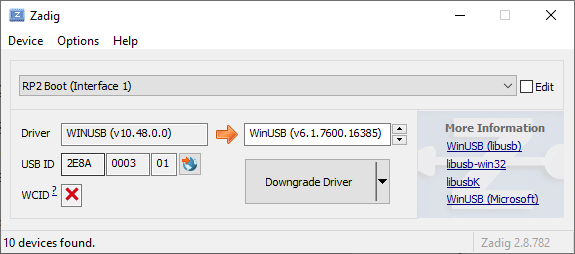
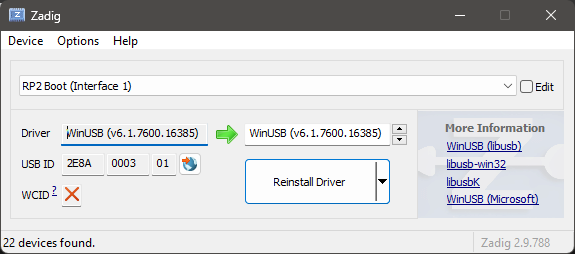
Can you please do the following:

  1. Plug in the Pico in BOOTSEL mode (BOOTSEL button pressed down during USB insertion)
  2. Take a screenshot of Zadig with the “RP2 Boot (interface 1)” selected
  3. In a VSCode terminal, execute this command and post the output
C:\Users\<username>\.platformio\packages\tool-picotool-rp2040-earlephilhower\picotool info -d

If it’s correct, it should say e.g.

Device Information
 type:        RP2040
 flash size:  2048K
 flash id:    0xE661410403705433

And in Zadig

Thank you maxgerhardt. I am sure you are sick and tired of posts like this. Believe me, if I could find an option I exhausted that I knew about I would explore it. Your help is my last wits end.
I am working on what you asked for and will have it in a few minutes.

Sigh. I REALLY HATE IT WHEN THIS HAPPENS!!!
Now all of a sudden it works. No idea why because I tried literally every option and had zero success. But now, as I tried it just one last time, it flashed it in quick order and it worked. And what I REALLY hate is that I have no idea why or what I fixed to get to this point. And I am very aggravated because it works now, with no idea why, and on top of that, I bugged you for help.

Here is what you asked for, and as I said, works now. It works. Great! So WHY am I not happy?? I mean I tried EVERYTHING! Nothing adds up here.


Response from that CLI you asked me to run, and believe me, I saved it for future reference.
In response to C:\Users\<username>\.platformio\packages\tool-picotool-rp2040-earlephilhower\picotool info -d

C:\Creative Imagination\code\platformio\rpi-pico_spi_master>C:\Users\xxx.platformio\packages\tool-picotool-rp2040-earlephilhower\picotool info -d
Device Information
type: RP2040
flash size: 2048K
flash id: 0xE6609CB2D36EA033

Maybe you replying was the magic I needed to make it work. I wish all my issues could be solved with good intentions without any interaction from me. :neutral_face:

Retrieving maximum program size .pio\build\rpipico\firmware.elf
Flash size: 2.00MB
Sketch size: 2.00MB
Filesystem size: 0.00MB
Maximium Sketch size: 2093056 EEPROM start: 0x101ff000 Filesystem start: 0x101ff000 Filesystem end: 0x101ff000
Checking size .pio\build\rpipico\firmware.elf
Advanced Memory Usage is available via "PlatformIO Home > Project Inspect"
RAM:   [          ]   3.7% (used 9756 bytes from 262144 bytes)
Flash: [          ]   3.0% (used 63224 bytes from 2093056 bytes)        
Configuring upload protocol...
AVAILABLE: blackmagic, cmsis-dap, jlink, picoprobe, picotool, raspberrypi-swd
CURRENT: upload_protocol = picotool
Looking for upload port...
Already found 1 device(s) RPxxxx device in BOOTSEL mode, not trying to do 1200bps reset.
Uploading .pio\build\rpipico\firmware.elf
Loading into Flash: [                              ]  0%
Loading into Flash: [=                             ]  5%
Loading into Flash: [===                           ]  10%
Loading into Flash: [====                          ]  16%
Loading into Flash: [======                        ]  21%
Loading into Flash: [========                      ]  27%
Loading into Flash: [=========                     ]  32%
Loading into Flash: [===========                   ]  38%
Loading into Flash: [============                  ]  43%
Loading into Flash: [==============                ]  48%
Loading into Flash: [================              ]  54%
Loading into Flash: [=================             ]  59%
Loading into Flash: [===================           ]  65%
Loading into Flash: [=====================         ]  70%
Loading into Flash: [======================        ]  76%
Loading into Flash: [========================      ]  81%
Loading into Flash: [==========================    ]  87%
Loading into Flash: [===========================   ]  92%
Loading into Flash: [============================= ]  97%
Loading into Flash: [==============================]  100%

Verifying Flash:    [                              ]  0%
Verifying Flash:    [=                             ]  5%
Verifying Flash:    [===                           ]  10%
Verifying Flash:    [====                          ]  16%
Verifying Flash:    [======                        ]  21%
Verifying Flash:    [========                      ]  27%
Verifying Flash:    [=========                     ]  32%
Verifying Flash:    [===========                   ]  38%
Verifying Flash:    [============                  ]  43%
Verifying Flash:    [==============                ]  48%
Verifying Flash:    [================              ]  54%
Verifying Flash:    [=================             ]  59%
Verifying Flash:    [===================           ]  65%
Verifying Flash:    [=====================         ]  70%
Verifying Flash:    [======================        ]  76%
Verifying Flash:    [========================      ]  81%
Verifying Flash:    [==========================    ]  87%
Verifying Flash:    [===========================   ]  92%
Verifying Flash:    [============================= ]  97%
Verifying Flash:    [==============================]  100%

  OK

The device was rebooted to start the application.
===================== [SUCCESS] Took 2.75 seconds =====================
1 Like

Sometimes rebooting a computer really helps work some magic, or some USB hub acted up, or some driver acted up, or it was a cable or a power supply issue. Let’s hope it stays working in any case.