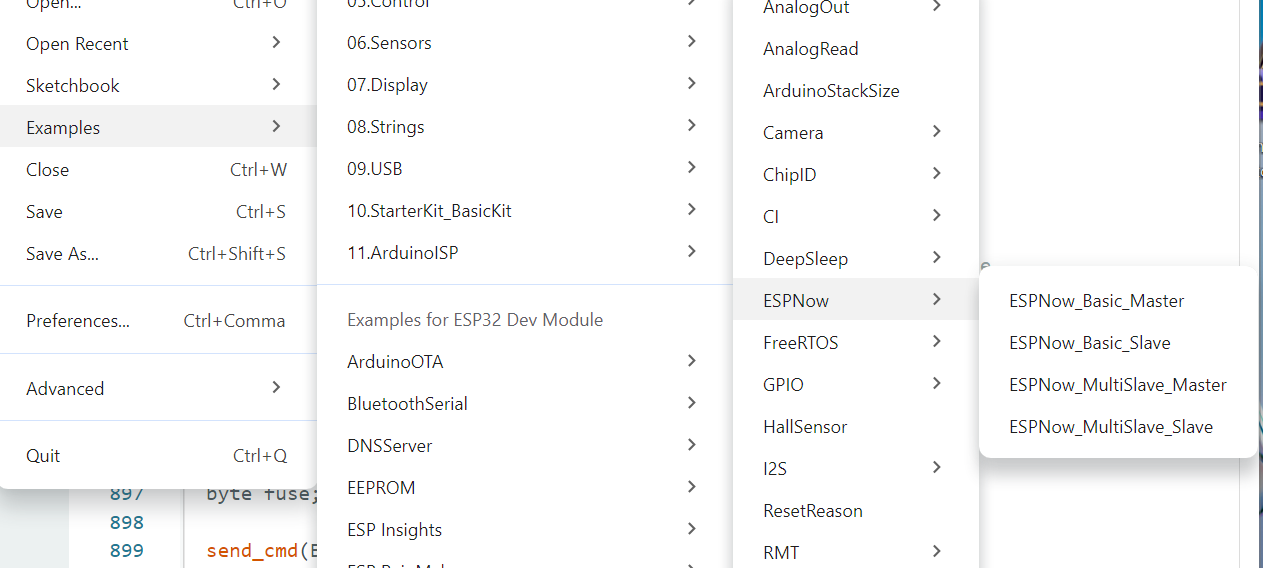
Hi Everyone.
I cannot find ESPNow in the examples and Search only tells me to select from list.
So is the Arduino build in examples also available in PlaformIO?
Hi Everyone.
I cannot find ESPNow in the examples and Search only tells me to select from list.
So is the Arduino build in examples also available in PlaformIO?
I assume you’re referring to the Arduino framework - If not, please specify exactly which examples you mean.
The Arduino based examples are available since Espressif Arduino 3.x
So you might need to switch from Arduino 2.x to Arduino 3.x which can be done by using the community fork pioarduino:
platform = https://github.com/pioarduino/platform-espressif32/releases/download/stable/platform-espressif32.zip
Thanks , I refer to this examples , ArduinoIDE.
I was looking at the wrong place in PlatformIO.
I can add ESPNow in the Libraries section , PlatformIO , this will work for now.
Thanks.
How do I get the variable data available to use in void loop()?
void onRecv(const uint8_t *mac_addr, const uint8_t *data, int data_len)
{
  char macStr[18];
  snprintf(macStr, sizeof(macStr), "%02x:%02x:%02x:%02x:%02x:%02x",
           mac_addr[0], mac_addr[1], mac_addr[2], mac_addr[3], mac_addr[4],
           mac_addr[5]);
  Serial.print("Last Packet Recv from: ");
  Serial.println(macStr);
  Serial.print("Last Packet Recv Data: ");
  // if it could be a string, print as one
  if (data[data_len - 1] == 0)
    Serial.printf("%s\n", data);
  // additionally print as hex
  for (int i = 0; i < data_len; i++)
  {
    Serial.printf("%x ", data[i]);

  }
I want to use data in void loop().
Serial.printf("%x ", data[i]);
If you’re on windows, these files located here:
C:\Users\<username>\.platformio\packages\framework-arduinoespressif32\libraries\ESP_NOW
WHY???
This is asynchronous code!
Every time a packet is received, the callback gets called.
If you want to have the packet data available in the loop() function, you have to copy the data to a global variable. But that doesn’t make any sense! (At least I don’t know a usecase for this).
Maybe you can explain in detail what you’re trying to acheive?
I want to replace a++ with a button then send a = 1 or a = 0;
The receiver will check in the void loop()
if(data == 0 )
{
do something
}
I think some code is missing here as I don’t see a++ in your code.
This sounds more like a question about how to send data. But the code above is the callback for receiving data!?
What’s your project about?
This is the Transmitter code.
void loop() {
    static uint8_t a = 0;
    delay(100);
    ESPNow.send_message(receiver_mac, &a, 1);
    Serial.println(a++);
}
The project is to replace the value of a with a button read.
Just a basic button press send and turn led on or off.
a = digitalRead(pin);
Then send.
Then on the Receiver side check in void loop() if data is 0 or 1.
Here is how I would do it:
sender.cpp
#include <Arduino.h>
#include <WiFi.h>
#include <esp_now.h>

const int BTN_GPIO = 0;

const uint8_t BROADCAST_MAC[] ={0xFF, 0xFF, 0xFF, 0xFF, 0xFF, 0xFF};

void setupEspNow() {
    WiFi.mode(WIFI_STA);

    if (esp_now_init() != ESP_OK) Serial.println("Failed to inizalize ESPNOW!");

    esp_now_peer_info_t broadcast_peer;
    broadcast_peer.channel = 1;
    broadcast_peer.encrypt = false;
    broadcast_peer.ifidx = WIFI_IF_STA;
    memcpy(broadcast_peer.peer_addr, BROADCAST_MAC, sizeof(broadcast_peer.peer_addr));

    if (esp_now_add_peer(&broadcast_peer) != ESP_OK) Serial.println("Failed to add broadcast peer!");
}

void setupButton() {
    pinMode(BTN_GPIO, INPUT_PULLUP);
}

void handleButton() {
    static uint8_t lastState;
    static uint32_t lastMillis;

    uint8_t currentState = digitalRead(BTN_GPIO);

    if (lastState == currentState) return;
    lastState = currentState;

    uint32_t currentMillis = millis();
    if (lastMillis && currentMillis - lastMillis < 50) return;
    lastMillis = currentMillis;

    Serial.printf("Button is %s\r\n", currentState ? "released" : "pressed");

    uint8_t data = !currentState;
    Serial.println(data);

    esp_now_send(BROADCAST_MAC, &data, sizeof(data));
}

void setup() {
    Serial.begin(115200);
    setupEspNow();
    setupButton();
}

void loop() {
    handleButton();
}
receiver.cpp
#include <Arduino.h>
#include <WiFi.h>
#include <esp_now.h>

void receiveCb(const esp_now_recv_info_t * esp_now_info, const uint8_t *data, int data_len) {
    Serial.println(*data);
    digitalWrite(LED_BUILTIN, *data);
}

void setupEspNow() {
    WiFi.mode(WIFI_STA);

    if (esp_now_init() != ESP_OK) Serial.println("Failed to inizalize ESPNOW!");
    if (esp_now_register_recv_cb(receiveCb) != ESP_OK) Serial.println("Failed to register receive callback!");
}


void setup() {
    Serial.begin(115200);
    pinMode(LED_BUILTIN, OUTPUT);
    Serial.println("Hello Receiver");
    setupEspNow();
}

void loop() {
}
*This example does not use the Arduino ESP-NOW library.
Thanks , I will test this tomorrow , replying from phone.
I get this error below for the Receiver code.The Sender code does compile.
In file included from src/main.cpp:3:
C:/Users/mike/.platformio/packages/framework-arduinoespressif32/tools/sdk/esp32/include/esp_wifi/include/esp_now.h:136:54: note:   initializing argument 1 of 'esp_err_t esp_now_register_recv_cb(esp_now_recv_cb_t)'
 esp_err_t esp_now_register_recv_cb(esp_now_recv_cb_t cb);
                                    ~~~~~~~~~~~~~~~~~~^~
*** [.pio\build\esp32dev\src\main.cpp.o] Error 1
==================================================== [FAILED] Took 14.08 seconds ===================================================
Platform.ini
; Please visit documentation for the other options and examples
; https://docs.platformio.org/page/projectconf.html

[env:esp32dev]
platform = espressif32
board = esp32dev
framework = arduino
lib_deps = regenbogencode/ESPNowW@^1.0.2
Update to Arduino 3.x (see my first post here).
I down graded to platform 6.4.0.
There is Libraries that does not work with the latest platform.
TFT_eSPI and RemoteXY
Where can I find a list of the platform versions ,eg 6.4.0 is 2.0.11
TFTeSPI does work on 3.x.
For the available versions see my list here.
If you stay on 2.x you have to use the older function signature for the onReceive callback. I can change the example later.
Thanks.
Yes the ESPNow examples 2.x does work.I did modify it as in your example.