Hi All. This is my first post on this forum.
I want to build Bruce Firmware locally on my PC for CYD-2432W328C. I have cloned the source from GIT, and when I try to build the code, I keep getting this error:
Resolving CYD-2432W328C dependencies…
Platform Manager: Installing Release Arduino Release v3.3.7 based on ESP-IDF v5.5.2.260206 · pioarduino/platform-espressif32 · GitHub
PackageException: Unknown archive type ‘d:\emb\Arduino\VSCode\CYD\Bruce_Firmware.pio\cache\downloads\43494ad2c7a4d12fd55cd89fb85602d0acfa913c’
I can’t seem to find the version of “platform-espressif32.zip” the path points to.
If I replace the default statement in the platform.ini file with:
platform = espressif32
I get the following
UndefinedEnvPlatformError: Please specify platform for ‘CYD-2432W328C’ environment
Can someone please help in getting my source to build?
Thanks
KV.
After Googling the missing information about “Bruce Firmware”, I finally found the GitHub repository.
Looking at the platformio.ini of that project I’m wondering about the platform-packages setting. This makes no sense to me, as pioarduino has all necessary packages. There is no reason for this.
So this question can only be answered by the maintainer of the “Bruce Firmware” project.
Please file an issue to https://github.com/BruceDevices/firmware/issues
Thank’s Boris(sivar2311), I’ll post the same at this link and hope for a solution.
Also I should have included more info about this firmware.
This is a very complex project!
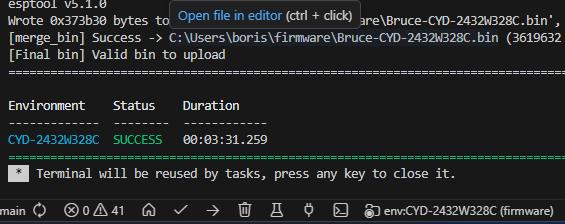
Cloning and building the firmware worked for me.
Installation and setup took around 20 minutes until all dependencies finished installing.
Compiling took 3 1/2 minutes on my Ryzen 7 5700X:
I suggest to delete the cloned repo and clone again.
You need a lot of time! Wait until everything finished installing
Hi Boris. I deleted the cloned repo and same error, so I took the nuclear option.
I googled how to completely remove platformio/vscode, and did so. After a complete new re-intall I re cloned the repo, and this time it worked. My vscode installation was over three years old, so…who knows.
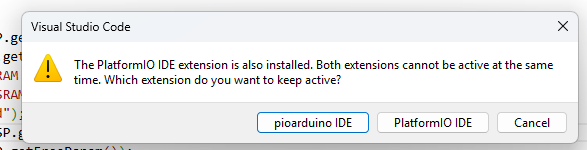
Although this time I was prompted to install the pioarduino IDE, and did so, only to find I keep getting this pop up.
Any ideas on what to do about it?
Thanks.
That would have been my next advice to you. 
No, you weren’t prompted to install, but VS Code suggested to install pioarduino IDE.
Now you have to choose between pioarduino IDE or PlatformIO IDE as the screenshot shows.
There can only be one. I suggest do stay with PlatformIO IDE.
Ok, thanks for your help, solved.