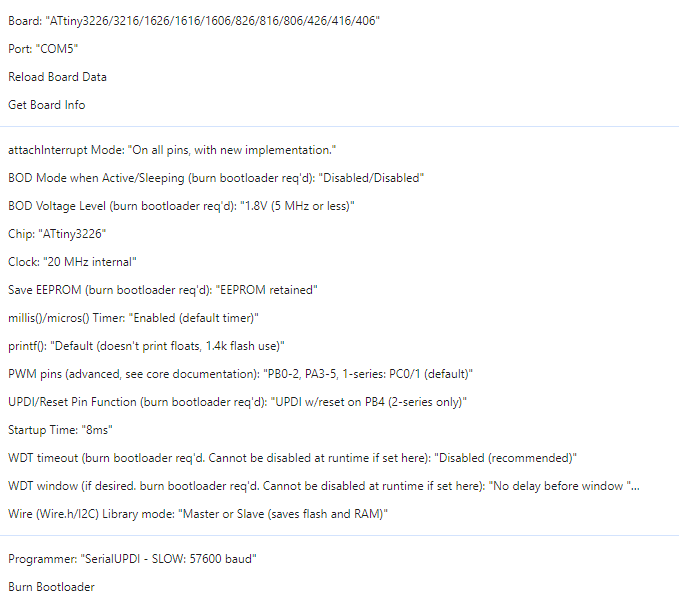
Hi,
I am trying to get platformio working with attiny3226.
So far I have managed to get the code to upload, but it isn’t working (flash an led).
Platformio.ini:
[platformio]
default_envs = Upload_UPDI

[env]
platform = atmelmegaavr
framework = arduino
board = ATtiny3226

board_build.core = megaTinyCore

board_build.f_cpu = 20000000L
board_hardware.oscillator = internal
board_hardware.bod = disabled
board_hardware.eesave = yes
board_hardware.updipin = updi_rst ; UPDI w/reset on PB4
board_hardware.millis = enabled

build_flags = -DCLOCK_SOURCE=0

monitor_speed = 9600

[env:Upload_UPDI]
upload_protocol = custom
upload_speed = 115200
upload_port = COM5
upload_command = pymcuprog write -d $BOARD_MCU -t uart -u $UPLOAD_PORT -b $UPLOAD_SPEED -v info -f $SOURCE
platform_packages =
    platformio/toolchain-atmelavr@~3.70300.0
Running platformio on vscode on windows 11. Homebuilt UPDI programmer with FTDI serial cable.
Code works fine on Arduino IDE.
#include <Arduino.h>

void setup() {
  pinMode(PIN_PB1, OUTPUT);
}

void loop() {
  digitalWrite(PIN_PB1, HIGH);
  delay(1000);
  digitalWrite(PIN_PB1, LOW);
  delay(1000);
}
Any help would be appreciated.
Thanks, Noel.
Please provide a screnshot of the Arduino IDE’s “Tool” menu with which compiling and uploading works.
I’ve checked the compiler flags between PlatformIO and the Arduino IDE and they should be equivalent. Note that the latest available PlatformIO package for the megaTinyCore is 2.6.7, not the latest 2.6.12.
One thing is that you don’t burn the fuses during the upload like the Arduino IDE would do
          ## Program pattern (all uploads through SerialUPDI)
          # Program will set fuses 2, 6 and 8 only. Fuses 0 and 4 are not written because the core never configures that.
          # If a user went and set that themselvesm we shouldn't undo it.
          # Fuse 1 is the BOD configuration, which could "brick" the chip if set for a higher voltage than the power rail.
          # Fuse 5 is SYSCFG0 which could disable UPDI and leave the board unprogrammable without HV programming.
          # That leaves OSCCFG to choose 16 vs 20 MHz clock, and SYSCFG1 (for startup time and stuff) and BOOTEND,
          # ensuring that a part previously set to use a bootloader will be unbootloaded cleanly, instead of the
          # bootloader being erased but no sketches working)

          tools.serialupdi.program.pattern={upload.prog_interlock}"{cmd}" -u "{runtime.platform.path}/tools/prog.py"  -t {protocol} {program.extra_params} -d {build.mcu}{upload.workaround} --fuses 0:{bootloader.WDTCFG} 2:{bootloader.OSCCFG} 6:{bootloader.SYSCFG1} 7:{bootloader.APPEND} 8:{bootloader.BOOTEND} "-f{build.path}/{build.project_name}.hex" -a write {program.verbose}
so it does expect a chip that has that already burned previously. Have you done that for the particular chip you’re uploading to?
Have you tried power cycling the device to see if it’s an issue with resetting the chip?
Additionally can you add --erase to your pymcuprog command like docs ?
Hi Max,
Many thanks.
Adding --erase to the upload command worked. LED now blinking!!
upload command of pio.ini now reads:upload_command = pymcuprog write --erase -d $BOARD_MCU -t uart -u $UPLOAD_PORT -b $UPLOAD_SPEED -v info -f $SOURCE
Chip had been previously programmed (and therefore fuses set) using ArduinoIDE. Is this the only way to set the fuses? Can it be done with PlatformIO?
How do I ensure PlatformIO is using correct version of megaTinyCore (2.6.7)?
Cheers, Noel.
PlatformIO’s atmelavr and atmelmegaavr platform do have a dedicated and customizable fuses target for that (pio run -t fuses on the CLI , also see docs ) but as per above quoted line, it will likely be infinitely easier to sniff the upload command used by the Arduino IDE once (File → Preferences → Verbose output during upload), which will give you the exact substutite for
--fuses 0:{bootloader.WDTCFG} 2:{bootloader.OSCCFG} 6:{bootloader.SYSCFG1} 7:{bootloader.APPEND} 8:{bootloader.BOOTEND}
and then you just add that in your existing upload command, so it will set fuses and upload the firmware in one go.