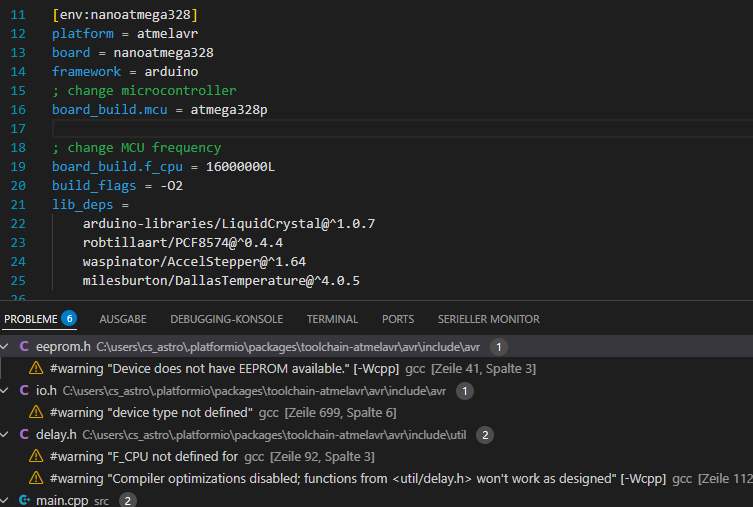
These are my includes:
#include <Arduino.h>

#include <LiquidCrystal.h>
#include <OneWire.h>

#include <DallasTemperature.h>
#include <Wire.h>

#include "EEPROM.h"
#include <AccelStepper.h>
#include <MultiStepper.h>

#include <avr/interrupt.h>
#include <avr/io.h>
#include <pcf8574.h>
#include <util/delay.h>
I cannot get rid of these errors as shown in the screenshot.
I think that the compiler is the avr gcc.
In the screenshot you can see that the board and the processor are specified correctly.
The 328p has EEPROM capabilities. Why is it not recognized?
In io.h device type is not recognized.
F_CPU is explicitely defined in platformio.ini
Optimization is activated by build_flags = -O2. (Found O2 by googling).
Could not find a remedy. What am I doing wrong?
Hi Christian!
Please post your complete platformio.ini and your code as pre-formatted text instead of screenshots. This way we can take a close look.
Remove unnecessary settings from your platformio.ini:
board_build.mcu (handled in board manifest)board_build.f_cpu (handled in board manifest)build_flags = -O2 (why?)
Also,perform a “verbose build” from the project options toolbar on the left side, that will give more information about the compilation.
Cheers,
Norm.
100% red hering warning messages with nothing behind them.
Copy the .vscode folder of your PlatformIO project to C:\Users\cs_astro\.platformio\packages\toolchain-atmelavr and see them “disappear”.
I guess when opening files outside the project folder tree, it does not use the .vscode/c_cpp_properties.json that defines all these settings.
Commented the lines out. Got stuck in compilation. Re-Statrted VS Code. Compilation works well now. I do not know why.
here the Ini file:
; PlatformIO Project Configuration File
;
; Build options: build flags, source filter
; Upload options: custom upload port, speed and extra flags
; Library options: dependencies, extra library storages
; Advanced options: extra scripting
;
; Please visit documentation for the other options and examples
; Redirecting...
[env:nanoatmega328]
platform = atmelavr
board = nanoatmega328
framework = arduino
; change microcontroller
;board_build.mcu = atmega328p
; change MCU frequency
;board_build.f_cpu = 16000000L
;build_flags = -O2 --verbose
lib_deps =
arduino-libraries/LiquidCrystal@^1.0.7

robtillaart/PCF8574@^0.4.4

waspinator/AccelStepper@^1.64

milesburton/DallasTemperature@^4.0.5
This is the result from verbose build
rocessing nanoatmega328 (platform: atmelavr; board: nanoatmega328; framework: arduino; lib_deps: arduino-libraries/LiquidCrystal@^1.0.7, robtillaart/PCF8574@^0.4.4, waspinator/AccelStepper@^1.64, milesburton/DallasTemperature@^4.0.5)
----------------------------------------------------------------------------------------------------------------------------------------------CONFIGURATION: Redirecting...
PLATFORM: Atmel AVR (4.2.0) > Arduino Nano ATmega328
HARDWARE: ATMEGA328P 16MHz, 2KB RAM, 30KB Flash
DEBUG: Current (avr-stub) External (avr-stub, simavr)
PACKAGES:
- framework-arduino-avr @ 5.1.0
- toolchain-atmelavr @ 1.70300.191015 (7.3.0)
LDF: Library Dependency Finder → Library Dependency Finder (LDF) — PlatformIO latest documentation
LDF Modes: Finder ~ chain, Compatibility ~ soft
Found 11 compatible libraries
Scanning dependencies…
Dependency Graph
|-- LiquidCrystal @ 1.0.7 (License: Unknown, Path: C:\Users\CS_Astro\Documents\PlatformIO\Projects\ArduinoRobofocus.pio\libdeps\nanoatmega328\LiquidCrystal)
|-- PCF8574 @ 0.4.4 (License: MIT, Path: C:\Users\CS_Astro\Documents\PlatformIO\Projects\ArduinoRobofocus.pio\libdeps\nanoatmega328\PCF8574)
| |-- Wire @ 1.0 (License: Unknown, Path: C:\Users\CS_Astro.platformio\packages\framework-arduino-avr\libraries\Wire)
|-- AccelStepper @ 1.64.0 (License: Unknown, Path: C:\Users\CS_Astro\Documents\PlatformIO\Projects\ArduinoRobofocus.pio\libdeps\nanoatmega328\AccelStepper)
|-- DallasTemperature @ 4.0.5 (License: MIT, Path: C:\Users\CS_Astro\Documents\PlatformIO\Projects\ArduinoRobofocus.pio\libdeps\nanoatmega328\DallasTemperature)
| |-- OneWire @ 2.3.8 (License: Unknown, Path: C:\Users\CS_Astro\Documents\PlatformIO\Projects\ArduinoRobofocus.pio\libdeps\nanoatmega328\OneWire)
|-- EEPROM @ 2.0 (License: Unknown, Path: C:\Users\CS_Astro.platformio\packages\framework-arduino-avr\libraries\EEPROM)
|-- OneWire @ 2.3.8 (License: Unknown, Path: C:\Users\CS_Astro\Documents\PlatformIO\Projects\ArduinoRobofocus.pio\libdeps\nanoatmega328\OneWire)
|-- Wire @ 1.0 (License: Unknown, Path: C:\Users\CS_Astro.platformio\packages\framework-arduino-avr\libraries\Wire)
Building in release mode
MethodWrapper([“checkprogsize”], [“.pio\build\nanoatmega328\firmware.elf”])
Advanced Memory Usage is available via “PlatformIO Home > Project Inspect”
RAM: [==== ] 35.8% (used 734 bytes from 2048 bytes)
Flash: [====== ] 62.0% (used 19040 bytes from 30720 bytes)
.pio\build\nanoatmega328\firmware.elf :
section size addr
.data 148 8388864
.text 18892 0
.bss 586 8389012
.comment 17 0
.note.gnu.avr.deviceinfo 64 0
.debug_aranges 384 0
.debug_info 3768 0
.debug_abbrev 1682 0
.debug_line 2198 0
.debug_str 520 0
Total 28259
======================================================== [SUCCESS] Took 3.58 seconds ========================================================
- Das Terminal wird von Aufgaben wiederverwendet, drücken Sie zum Schließen eine beliebige Taste
I do not understand why there are different messages on different ways of building.
When doing the verbose build I do not get any indication of problems. (see red arrow)
When I change an entry in the ini file and click on option a. I get the message of 2 problems. In this case 2 unused variables. Clicking on a again does the build but no indication of the problems.
Clicking on see image b does not do anything.
To me it is irritating to get different information.
The good thing is that the build seems to work properly.
Many thanks to you all

The compiler warnings are only captured from the compiler output per-build and not saved accross builds. If you build a firmware twice, you can have 9999 warnings during the first compilation, and when you press “build” the second time it doesn’t recompile or relink anything (because all object files were already built) and then you get 0 warnings 0 errors.
If you want a proper report, do a clean rebuild (project tasks → clean, project tasks → build), or let PlatformIO generate an actual C/C++ linter report using cppcheck or similiar, see