I’m receiving the same error.
According to
and
Invoking the debugger should be <python path> C:\Users\<user>\.platformio\packages\tool-pyocd\pyocd-gdbserver.py -t lpc11u24
Invocation of that also fails immediately
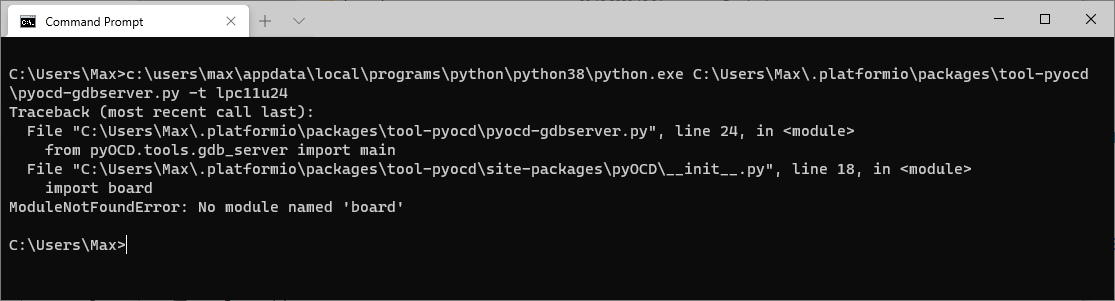
Can you please try the following:
I’m assuming you have a Python3 installation, which can be accessed in the terminal (Windows+R → cmd.exe) via python or python3 (check python --version to be 3.x).
Then install PyOCD normally by executing python -m pip install pyocd. Then follow the instructions at GitHub - pyocd/pyOCD: Open source Python library for programming and debugging Arm Cortex-M microcontrollers for correctly adding libusb support.
Then, execute pyocd --version to check whether it was installed correctly and is in the path. If not, you might need to add the Scripts folder of your Python installation to your PATH (e.g. C:\Users\<user>\AppData\Local\Programs\Python\Python38\Scripts, see tutorial) .
Connect the target board to your PC and execute pyocd gdbserver -t lpc11u24. Post the output. Can pyOCD connect to the board?
Output should look something like
>pyocd gdbserver -t lpc11u24
0000615:INFO:board:Target type is lpc11u24
0000631:INFO:dap:DP IDR = 0x1ba01477 (v1 rev1)
0000646:INFO:ap:AHB-AP#0 IDR = 0x14770011 (AHB-AP var1 rev1)
0000698:INFO:rom_table:AHB-AP#0 Class 0x1 ROM table #0 @ 0xe00ff000 (designer=020 part=410)
0000698:INFO:rom_table:[0]<e000e000:SCS-M3 class=14 designer=43b part=000>
0000698:INFO:rom_table:[1]<e0001000:DWT class=14 designer=43b part=002>
0000698:INFO:rom_table:[2]<e0002000:FPB class=14 designer=43b part=003>
0000698:INFO:rom_table:[3]<e0000000:ITM class=14 designer=43b part=001>
0000698:INFO:rom_table:[4]<e0040000:TPIU-M3 class=9 designer=43b part=923 devtype=11 archid=0000 devid=ca0:0:0>
0000698:INFO:cortex_m:CPU core #0 is Cortex-M3 r1p1
0000713:INFO:dwt:4 hardware watchpoints
0000713:INFO:fpb:6 hardware breakpoints, 4 literal comparators
0000729:INFO:server:Semihost server started on port 4444 (core 0)
0000729:INFO:gdbserver:GDB server started on port 3333 (core 0)
If that is all good, we can redefine the debugging command by adding
debug_tool = custom
debug_server =
  pyocd
  gdbserver
  -t
  lpc11u24
to the platformio.ini, which should then use your global PyOCD installation.