Hm no that’s still wrong, the USB drive doesn’t accept .bin files but .uf2 files. I re-read the code again and you shouldn’t use mbed but
upload_protocol = picotool
upload_port = E:
instead.
I’m actually trying this on Windows 10 too but the tool fails to connect
C:\Users\Max\.platformio\packages\tool-rp2040tools>picotool.exe info
No accessible RP2040 devices in BOOTSEL mode were found.

but:

Device at bus 2, address 9 appears to be a RP2040 device in BOOTSEL mode, but picotool was unable to connect
AHA. The device manager showed an unknown device. I used https://zadig.akeo.ie/ to load libusb-win32 drivers…
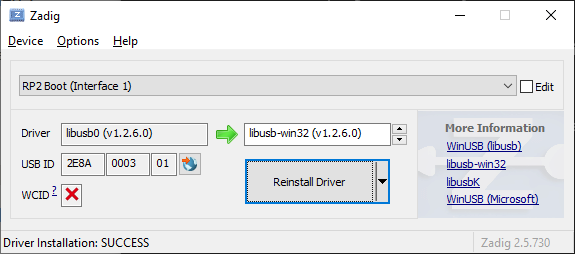
and now it says…
>picotool.exe info
Program Information
 none
so no error anymore.
And uploading works now too and it blinks! Yay!
Uploading .pio\build\pico\firmware.elf
rp2040load 1.0.1 - compiled with go1.15.8
.Loading into Flash: [                              ]  0%
Loading into Flash: [=                             ]  5%
Loading into Flash: [===                           ]  11%
Loading into Flash: [====                          ]  16%
Loading into Flash: [======                        ]  22%
Loading into Flash: [========                      ]  27%
Loading into Flash: [=========                     ]  33%
Loading into Flash: [===========                   ]  39%
Loading into Flash: [=============                 ]  44%
Loading into Flash: [===============               ]  50%
Loading into Flash: [================              ]  55%
Loading into Flash: [==================            ]  61%
Loading into Flash: [===================           ]  66%
Loading into Flash: [=====================         ]  72%
Loading into Flash: [=======================       ]  78%
Loading into Flash: [========================      ]  83%
Loading into Flash: [==========================    ]  89%
Loading into Flash: [============================  ]  94%
Loading into Flash: [==============================]  100%


========================= [SUCCESS] Took 3.47 seconds =========================